The Seedream 4.5 API gives you ByteDance's image model through a simple HTTP call. Pick a host that serves the model, create an API key in its dashboard, and POST a prompt with an aspect ratio and a quality tier. Basic quality returns 2K images and high returns 4K. On hosts that publish a flat rate, the price is about $0.03 to $0.04 per image.
The hard part is that Seedream 4.5 reaches developers through many gateways, and no two behave the same. Parameter names, reference image limits, file formats, and prices all differ. A request that works on one host fails validation on the next, and a cheap listing can hide a 4K surcharge.
This guide covers the decision in four steps: compare providers, get a key, send your first request, and harden the integration for production. Geodd runs the Seedream family next to its text models behind one OpenAI-compatible API, so I also point out where the newer Seedream 5.0 Pro is the better fit.
What Seedream 4.5 does and what it costs
Seedream 4.5 handles text-to-image generation, single-image editing, and multi-image editing, and typical Seedream 4.5 API prices run from $0.03 to $0.04 per image. Know both before you pick a host, because they decide which provider fits.
What the model does
Seedream 4.5 is ByteDance Seed's image model for generation and editing. Compared with Seedream 4.0, ByteDance reports gains in prompt adherence, dense text rendering, and multi-image editing that keeps subjects and reference details intact. Seedream 4.0 is a separate model, so a listing for a "Seedream 4 API" is not the same endpoint. Check that the model ID says 4.5.
| Capability | Typical value |
|---|---|
| Modes | Text-to-image, image editing, multi-image input |
| Resolution tiers | 2K and 4K (no 1K) |
| Output at 16:9 | 2848×1600 (2K), 5504×3040 (4K) |
| Aspect ratios | 1:1, 4:3, 3:4, 16:9, 9:16, 2:3, 3:2, 21:9 |
| Reference images | Up to 14 per request |
| Prompt length | Up to 3,000 characters on one host, 2,000 tokens on another |
| Execution | Asynchronous: you get a task, then the image |
Limits vary by host, so treat this table as common ground and confirm exact numbers in your provider's docs.
What it costs per image
Published prices cluster tightly. OpenRouter lists $0.04 per output image. EvoLink lists $0.03 per image and cites $0.04 as the official BytePlus rate. At those prices, 1,000 images cost $30 to $40. Two things move the bill: 4K output can cost more on some hosts, and asking for several images per call multiplies the charge.

Per-image prices are similar everywhere, so choose a host on limits and reliability, not on a one-cent gap.
Step 1. Choose a provider
Choose the host whose parameters, limits, and data handling match your app. Seedream 4.5 is not one endpoint, so this decision shapes every request you write afterward.
Compare the hosts
The listings below come from each provider's own model page. Prices change, so confirm before you commit.
| Host | Model ID | Listed price | Worth knowing |
|---|---|---|---|
| OpenRouter | bytedance-seed/seedream-4.5 | $0.04 per output image | Fits teams already routing models through it |
| EvoLink | doubao-seedream-4.5 | $0.03 per image | Up to 14 reference images, 10 MB each |
| Kie.ai | seedream/4.5-text-to-image, seedream/4.5-edit | Shown on its pricing card | Separate edit model, 80 free credits for new users |
Replicate also hosts it as bytedance/seedream-4.5, and ByteDance sells it directly through BytePlus.
Decide with four checks
Run each candidate through these questions:
- Does the ID say 4.5? Seedream 4.0 and 5.0 listings sit right beside it.
- Does it offer a callback or webhook? You will want one for batch jobs.
- Where does it process and store your images? This matters if you handle customer photos.
- Is there free credit for testing? Use it before you add billing.
Verify the model ID and the data handling before the price. A wrong version or a vague retention policy costs more than a cent per image.
Step 2. Get your API key
You get a Seedream 4.5 API key by creating an account with your chosen host and generating a key in its dashboard. The process takes a few minutes and works the same way on nearly every gateway.
Create the key
- Sign up with the provider.
- Open the API keys page. It may be called API Key Management or Keys.
- Create a key and name it after the app and environment, such as
poster-service-prod. - Copy it immediately. Most dashboards show the full value once.
- Add credits or a payment method if the free balance is small.
Every request then sends the key as a Bearer token in the Authorization header.
Keep it out of your code
Never paste a live key into source control. Load it from an environment variable, and use separate keys for development and production so you can revoke one without breaking the other.
export SEEDREAM_API_KEY="paste-your-key-here"
Step 3. Send your first request
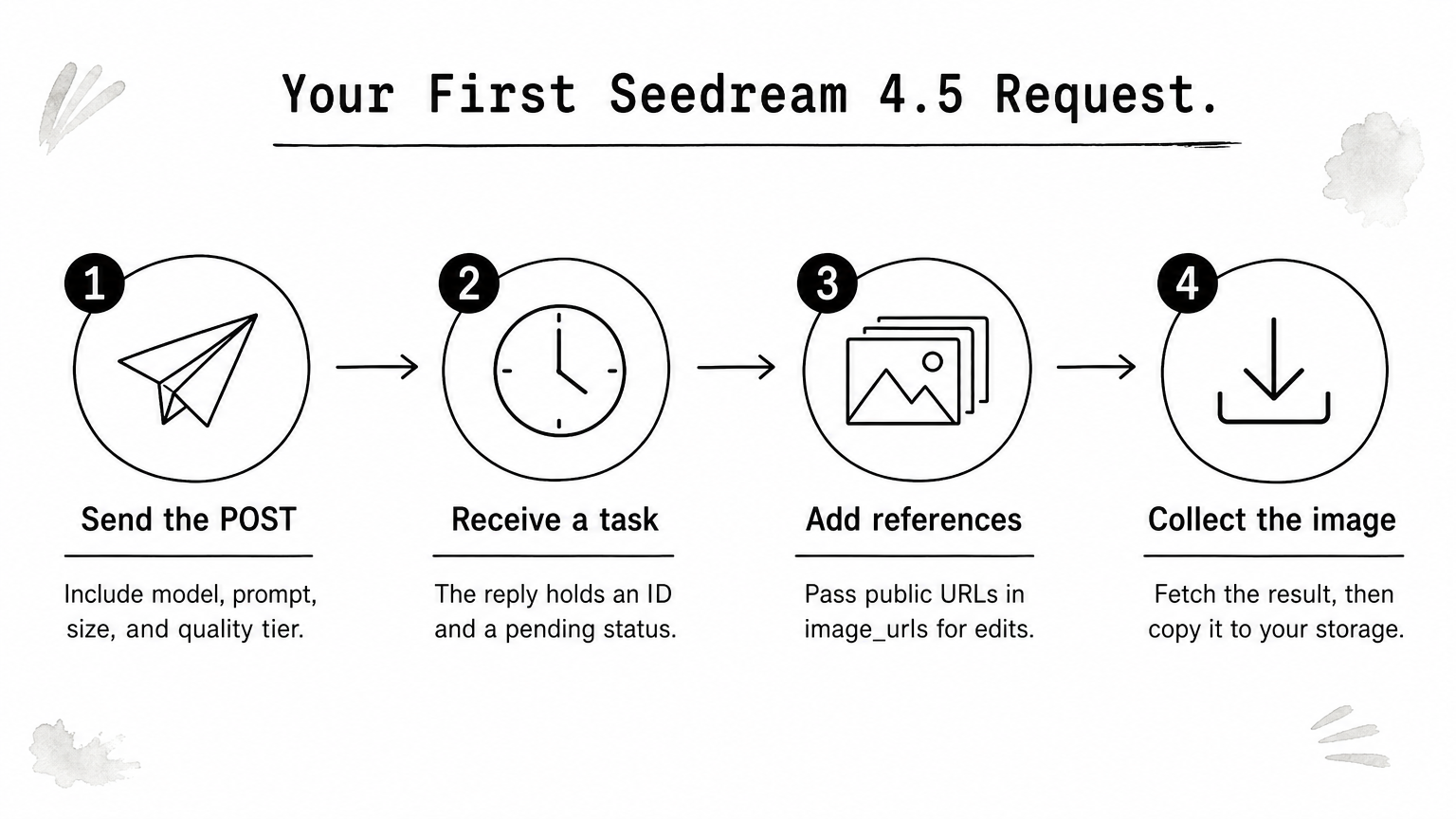
A Seedream 4.5 API call is one authenticated POST with the model, a prompt, a size, and a quality tier. Run the same prompt at two quality levels first, so you see the output size and cost difference yourself.
Generate an image
This example uses the EvoLink-style contract. Swap the host and path for your provider.
curl -X POST https://api.your-provider.com/v1/images/generations \
  -H "Authorization: Bearer $SEEDREAM_API_KEY" \
  -H "Content-Type: application/json" \
  -d '{
    "model": "doubao-seedream-4.5",
    "prompt": "Jazz night poster, cream paper, title \"MIDNIGHT NOTES\", small line \"Live Jazz - Friday 8 PM\"",
    "size": "16:9",
    "quality": "2K",
    "n": 1
  }'
The reply is a task object with an ID and a pending status, not the image itself. Field names differ by host. Kie.ai, for example, calls the size field aspect_ratio and names the tiers basic and high.
Edit with reference images
For edits, add image_urls with publicly reachable links. Keep reference images plus requested outputs within the host's combined cap, which is 15 on EvoLink.
{
  "model": "doubao-seedream-4.5",
  "prompt": "Keep the layout. Change the title to \"WEEKEND SPECIALS\" in the same chalk style.",
  "image_urls": ["https://example.com/menu.png"],
  "size": "4:3"
}
Write what must stay unchanged as explicitly as what must change. Edits follow the prompt literally.
Step 4. Collect results and harden the integration
Treat the Seedream 4.5 API as an asynchronous job service. Your code should submit a task, wait for completion, store the file, and verify it before anything reaches a user.
Collect and store the result
Use a callback URL when your host supports one, or poll the task status endpoint every few seconds. Verify callback signatures if the host signs them, as Kie.ai does with HMAC. Some hosts expire links quickly. EvoLink's are valid for 24 hours, so copy each image to your own storage on arrival. Read the file type from the response too. One host's tests returned JPEG, though the format is not fixed to PNG or JPEG.
Check every edit before publishing
In one multi-image test, an inserted character covered part of a menu line the prompt said to keep. Compare each output with its references, and put exact on-image text in quotation marks. Add a retry with backoff for failed tasks, and cap n so a bug cannot multiply your bill.
Never ship a generated image you have not compared against its inputs.
Pick a host and send the first call
Seedream 4.5 costs about $0.03 to $0.04 per image, needs one API key, and takes one asynchronous POST. Pick a host by model ID, limits, and data handling. Then test at 2K, upgrade to 4K only where you need it, and verify every edit.
If your project can use a newer model, compare it with Seedream 4.5 on the same prompts before you build around the older one. Geodd serves Seedream 5.0 Pro through its API, with per-image pricing and usage examples on the model page.