The best AI image generation API depends on what you are building. OpenAI suits precise editing and multi-turn refinement. Google suits prototypes that need a free tier. OpenRouter, Runware, and Eden AI suit teams that want many models behind one key. Cloudflare Workers AI suits a zero-dollar side project. Geodd suits teams that want Seedream 5.0 Pro on the same account as their text models.
Choosing is harder than it should be. Providers bill per image, per token, per megapixel, or in credits. "Free" can mean a permanent daily allowance or a handful of test images. Parameter names, response formats, and content rules differ, so a wrong pick means rewriting your integration later.
This guide covers eight APIs. Each entry explains what the API offers, how it is priced, whether a free route exists, and who should skip it. Two shorter sections then break down free options and show how to compare and call an API. Geodd, the publisher of this blog, runs inference for text, image, and video models, so it appears first, and we state its limits plainly. Prices change often, so we describe pricing models and point you to official pricing pages instead of freezing numbers.
1. Geodd Seedream 5.0 Pro
What it offers
Geodd serves ByteDance's Seedream 5.0 Pro image model on the same platform that hosts its text models, so one account covers your image generation API and your language model calls. The model page documents supported inputs and includes API usage examples. The core capabilities are:
- Text-to-image generation from a prompt
- Image-to-image workflows that start from a reference picture
- Multi-image blending that merges several inputs into one result
Data handling matters for image prompts too. Geodd applies a Zero Data Retention policy, runs active regions in US-EAST and EU-NORTH (Norway), and describes its handling as GDPR-ready. Confirm which regions serve this specific model on its page before you promise data residency to a customer.
One account for text, image, and video models means one key, one bill, and one data policy to review.
Pricing and free access
Seedream 5.0 Pro is billed per image, and the model page lists the current rate. Geodd does not advertise a free image tier, so budget for paid calls from your first test.
Seedream 5.0 Lite has its own page in the model catalog if you want to compare a lighter variant. To estimate monthly spend, multiply expected images by the listed rate, then add a margin for regenerations when users reject a result.
Who it suits
Teams that already call Geodd for text inference get the most from it. Your image calls share authentication and billing with your language models, and EU customers who ask about retention get a clear answer. Video generation through the Seedance family sits on the same platform if you expand later.
Skip it if you want a permanent free tier or hundreds of interchangeable image models behind one endpoint. The gateways further down fit that job better.
2. OpenAI image generation API
What it offers
OpenAI exposes image generation through two APIs, and the choice matters. The Image API handles one-shot generations and edits, including edits where a mask marks the area to replace. The Responses API treats image generation as a built-in tool inside a conversation, which adds multi-turn editing and lets you pass file IDs instead of raw bytes.
- Two models:
gpt-image-2.5-sunburstfor editing precision andgpt-image-2.5-flarefor fast everyday generation - Output controls for quality, size, format, and compression
- An
nparameter for several images per request, and streaming with 0 to 3 partial images
Expect one extra step. Some organizations must complete API Organization Verification in the developer console before using GPT Image models. Read the official image generation guide before you set a launch date.
Choose the Image API for single requests and the Responses API for editable, conversational image flows.
Pricing and free access
OpenAI does not charge one flat price per image. Cost depends on the model, quality setting, and image size, and the pricing page lists current rates. That is the real answer to what the image generation API costs: it moves with the options you choose.
Free access is not something to plan around, so treat it as a paid API. Tune prompts at low quality and small sizes, then raise quality only for final renders.
Who it suits
Developers building editors, design tools, or chat experiences gain the most. Mask-based edits and conversational refinement are the strongest parts of this AI image generation API, and few rivals match them.
Skip it if per-image cost dominates your margin, or if your organization cannot complete verification in time.
3. Google Gemini API and Imagen
What it offers
Google offers image generation through the Gemini API for fast prototyping and through Vertex AI for teams that need Google Cloud governance. You can use Imagen models for text-to-image, or Gemini models with native image output for conversational generation and editing. Google also adds an invisible SynthID watermark to images its models generate, which helps provenance.
The Gemini API is the quicker path. You create a key in Google AI Studio and call it with the official SDKs. Vertex AI adds IAM, regional controls, and enterprise billing, at the cost of more setup.
Start in the Gemini API, then move to Vertex AI when governance and billing controls start to matter.
Pricing and free access
Is Google's image API free? Partly. The Gemini API has a free tier for some models, but whether a given image model is included, and at what rate limits, changes between releases. Check the Gemini API pricing page for the exact model you plan to use instead of assuming.
Paid use is billed per model, and Vertex AI lists its own rates. Data-use rules can differ between free and paid tiers, so read the terms for unpaid usage and keep customer images out of free-tier calls.
Who it suits
Prototypers who want to test an image feature without a credit card fit best, along with teams already on Google Cloud. A free AI image generation API for a demo is easier to find here than almost anywhere else.
Skip it if you need guaranteed free quotas that never change, or if the watermark conflicts with your provenance requirements.
4. Leonardo AI API
What it offers
Leonardo describes its API as a visual-first image and video generation API for founders, solo builders, and product teams. Both media types sit on one platform, so an app that starts with stills can add video later without changing vendors. The pitch is design quality and creative control, not a catalog of third-party models.
Because Leonardo is a creative product company first, its API suits workflows that mirror its web studio: concept art, game assets, and marketing visuals. Read its API documentation for exact endpoints, parameters, and model lists, since these evolve.
Leonardo fits design-led products better than general-purpose model shopping.
Pricing and free access
Leonardo sells API access through plans. Check how the current plans meter usage, whether by credits or by request, and what rate limits apply. Those details differ by plan and change over time.
Do not assume a free tier for production use. To test, run a few calls on the smallest plan, measure the cost per image, and project monthly spend from that number.
Who it suits
Product teams building creative tools, asset generators, or marketing automation get the most. If one vendor for stills and video appeals to you, this image generation AI API is a reasonable single-vendor bet.
Skip it if you want to swap models freely between vendors or you need a free tier to launch.
5. Runware
What it offers
Runware positions itself as a low-latency image generation API with thousands of models behind it. You pick a model, mix techniques inside one workflow, and control generation parameters per request. The appeal is breadth and speed for teams that want to try many models.
- A large model catalog rather than one house model
- Per-request parameter control, so you can tune output precisely
- A focus on low latency for interactive features
More parameters mean more to learn. Test each model's defaults, because results vary widely between models.
Runware trades simplicity for breadth: more models and more control, with more choices to make.
Pricing and free access
Runware bills by usage, and the rate depends on the model and settings you choose. Check its pricing page for per-image costs on the specific models you shortlist.
Compare at equal sizes and step counts. A cheap model run with fewer steps looks better than it is, so normalize your tests before you decide.
Who it suits
Teams running an image feature at volume, caring about latency, and wanting to test several models before locking one in will like it. It is a strong candidate when you want the best AI image generation API for your exact style and not a vendor's default.
Skip it if you want one stable house model with minimal parameters to manage.
6. Eden AI
What it offers
Eden AI is an aggregator. Its image generation API lets you call several providers through one interface and one set of credentials, so you can compare outputs or add a fallback without separate integrations.
- One request format across providers
- Simpler A/B testing of image quality
- A single account and billing relationship
The trade-off is a lowest-common-denominator feature set. Provider-specific tools, such as mask-based edits or streaming partial images, may not pass through the unified interface, so check the docs for the provider you actually want.
An aggregator saves integration time, but you give up some provider-specific features.
Pricing and free access
You pay through Eden AI rather than each vendor. Compare its per-image rate with going direct, because an aggregator can add a margin or platform fee. Confirm on its pricing page whether any free allowance exists, since this changes.
Run the same prompt through two or three underlying providers during a trial. The price gap and quality gap together tell you if the convenience is worth it.
Who it suits
Teams that do not yet know which provider they will standardize on benefit most. An ai api for image generation behind a single interface also helps products that need a fallback when one provider has an outage.
Skip it if you depend on advanced provider-specific editing features.
7. OpenRouter image API
What it offers
OpenRouter has a dedicated Image API. You send a POST request with a model and prompt to /api/v1/images and receive base64 images. A discovery endpoint at /api/v1/images/models lists every image model with its capabilities, and per-model endpoint records show which providers serve it.
resolutiontiers from 512 to 4K, plusaspect_ratioandsizequality(auto, low, medium, high),output_format(png, jpeg, webp, and svg for vectorization models), and a transparentbackground- Up to 10 images per call with
n, aseed, reference images throughinput_references, and SSE streaming where a model supports it
Provider routing lets you sort eligible endpoints by price, throughput, or latency, or pin a provider and turn off fallbacks. Not every model accepts every parameter, so check each model's supported_parameters first.
OpenRouter turns model choice into a request parameter, so switching image models is a one-line change.
Pricing and free access
Each endpoint record lists pricing lines billed per image, per megapixel, or per token, so you can read the exact cost before you call. Billing is all-or-nothing. A completed generation is billed in full, and a failed or cancelled one is not billed. Partial preview images from streaming never create partial charges.
Free access depends on the model. Filter the models page by image output to see what is available and at what price, and do not assume a given model is free.
Who it suits
Developers who want one key, model portability, and cost-aware routing across image models get the most. It is a strong pick if your ai image generation api free or cheap search is really about comparing prices across providers.
Skip it if you rely on a vendor-only feature that its unified parameters do not expose.
8. Cloudflare Workers AI
What it offers
Cloudflare Workers AI lets you run open image models, such as FLUX.1 schnell and Stable Diffusion XL, from a Worker, so you write the HTTP endpoint yourself. Community templates wrap this into a small image generation API you deploy to your own account, and they advertise up to 100,000 calls per day. That figure is the Workers free request limit, not an image allowance.
The practical cap is the Workers AI free compute allocation, measured in Neurons per day (10,000 on the free plan). Each image consumes a meaningful share of it, so expect a modest number of images daily, far below 100,000.
The 100,000 daily calls is a request ceiling. The Neuron allocation decides how many images you actually get.
Pricing and free access
Usage is free up to the daily allocation, then billed on a usage basis on a paid plan. Check the Workers AI pricing page for model-specific rates, because they differ between models.
Free here comes with no promise on latency or availability, and each model carries its own license. Review those license terms before using output commercially.
Who it suits
Prototypes, hackathons, internal tools, and learning projects fit well. It is the most practical route if you searched for a free AI image generation API and have an engineer who can write a short Worker.
Skip it for customer-facing products that need consistent quality, support, and an uptime commitment.
Free AI image generation APIs and what to expect
Free tiers and trial credits
A free tier is the safest free route. Google's Gemini API and Cloudflare Workers AI both offer allowances on some models, while OpenAI, Geodd, and most gateways expect payment from the first call. Free tiers share three limits: low rate limits, no uptime commitment, and terms that can restrict commercial use or allow data use.
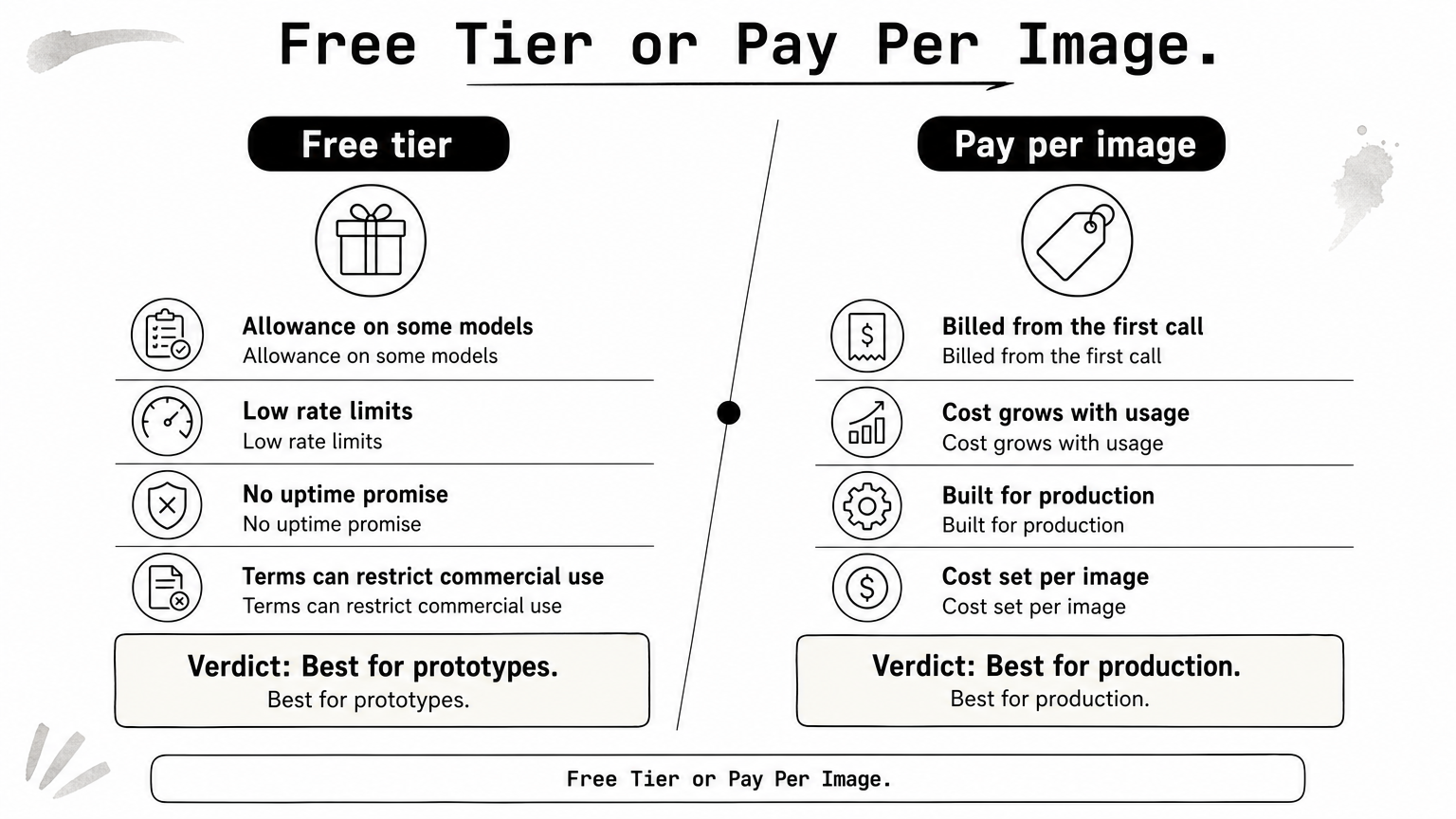
| Route | Cost | Main limit | Best use |
|---|---|---|---|
| Free tier (Google, Cloudflare) | $0 up to an allowance | Rate limits, terms | Prototypes |
| Self-hosted open models | GPU cost only | You run and scale it | Steady volume |
| Community GitHub API | $0 | Reliability, no support | Learning |
| Pay-per-image API | Per image | Cost grows with usage | Production |
Every free image generation API trades cost for limits on volume, reliability, or terms, so match the trade to your stage.
Open models you run yourself
Open-weight models such as FLUX and Stable Diffusion cost nothing to download, but they are not free to run. You pay for GPU time, plus engineering time for queueing, scaling, and monitoring. If steady volume justifies it, dedicated GPU servers give you single-tenant NVIDIA capacity with direct server access.
Check each model's license before building on it, because some open weights restrict commercial use. At low volume, a pay-per-image API almost always costs less overall than a GPU you keep warm.
Free GitHub and tutorial APIs
Tutorials and repositories show how to deploy a "free" image API on Cloudflare Workers, and they work well as learning projects. You own the deployment, so reliability and limits are your responsibility. These guides help you understand the moving parts of an image generation AI free API setup.
Treat any public endpoint that needs no key as a demo. It can disappear, log your prompts, or throttle you without warning, which makes it unsuitable for anything customer-facing.
How to compare and integrate an image API
Match the API type to your need
Pick by the kind of API first, then by price. Single-vendor APIs offer depth, gateways offer choice, and edge platforms offer a free start.
| API type | Examples here | Strength | Trade-off |
|---|---|---|---|
| Single-vendor model APIs | Geodd, OpenAI, Google, Leonardo | Deep features, consistent behavior | Tied to one vendor's models |
| Multi-model platforms | Runware, Eden AI, OpenRouter | Model choice, fallbacks, routing | Fewer vendor-specific features |
| Self-run on edge | Cloudflare Workers AI | Free allowance, open models | Quality and uptime limits |
Then match your need to a pick:
- Precise edits and conversational flow: OpenAI
- Free prototyping: Google or Cloudflare
- Many models behind one key: OpenRouter, Runware, or Eden AI
- Design-led creative product: Leonardo
- Images beside text models with Zero Data Retention and US or EU regions: Geodd
Decide on the API type and your must-have feature first, then compare per-image prices within that group.
Run your first request
Most single-vendor APIs follow the same pattern: send a prompt, receive base64 data, decode it, and save the file. This example follows the OpenAI Python SDK pattern.

from openai import OpenAI
import base64

client = OpenAI()

result = client.images.generate(
    model="gpt-image-2.5-sunburst",
    prompt="A watercolor robot reading in a library",
)

with open("robot.png", "wb") as f:
    f.write(base64.b64decode(result.data[0].b64_json))
Gateways and other vendors use their own request shapes, so change the endpoint, model ID, and field names to match their docs. Whichever ai image generation api you pick, run the same five prompts through your shortlist and compare quality side by side.
Plan for production
A working demo is not a production plan. Before you commit, check these points:
- Cost per image at your real size and quality, including regenerations
- Rate limits and concurrency, especially for bursts
- Storage, since returned images should be saved to your own bucket
- Content policy, because hosted APIs enforce rules and major providers restrict explicit content
- Data retention and licensing for prompts, inputs, and outputs
Read content policies early. Discovering a block after launch is far more expensive than reading the usage terms before you build.
Picking your image API
Match the API to the job. OpenAI leads on editing, Google and Cloudflare lead on free starts, OpenRouter, Runware, and Eden AI lead on model choice, Leonardo leads on design-first workflows, and Geodd leads when images should live beside your text models under one account and one data policy. Whichever you choose, test with your own prompts and verify pricing on the official page.
If you want a hosted image model on the same platform as your language models, try Seedream 5.0 Pro on Geodd and see per-image pricing and usage examples on its model page.