Picking between DeepSeek R1 vs V4 is not a simple version upgrade question. R1 arrived as a dedicated reasoning model, built to think step by step before it answers. V4 comes in two variants, Pro and Flash, and folds reasoning into a general-purpose model family. If you are choosing what to run in production, the differences in cost, speed, and memory limits matter more than the release dates.
Here is the short answer. V4 Pro is the better pick for complex reasoning, coding, and long agentic tasks, while V4 Flash fits high-volume workloads where latency and cost per token decide the outcome. R1 still works for existing pipelines, but for new builds, V4 is the stronger default.
Below, we compare the two models side by side on benchmarks, pricing, and context window, then look at reasoning behavior and real-world use cases. At Geodd, we serve DeepSeek V4.1 Pro and Flash through an OpenAI-compatible API, so we see how these models behave under long-running production loads. You will get a clear view of which one to deploy and why.
Why the R1 vs V4 choice matters for your stack
Model choice is an infrastructure decision, not a settings toggle. The DeepSeek model you pick sets your token bill, your response times, and how often long jobs fail halfway through. The DeepSeek R1 vs V4 question usually reaches your desk when one of those three starts to hurt.
Reasoning tokens change the math
R1 writes a long chain of thought before every answer. Those thinking tokens are billed as output, and they add seconds of waiting before your user sees anything useful. A short question can burn thousands of tokens on reasoning alone. For a chat feature with a tight latency budget, that hidden token overhead often costs more than the visible answer.

V4 splits the job across two variants. Pro is the heavy option for hard problems. Flash is the lean option for volume. That split lets you route traffic by difficulty instead of paying reasoning prices on every request.
Agents make this sharper. A single agent task can call the model anywhere from 20 to 200 times. A small gap in per-call latency or error rate multiplies across every step. If one call in fifty times out, a long task fails often, and every retry repeats work you already paid for.
In agent workloads, the number that matters is cost per completed task, not cost per token.
What the wrong pick costs you
Most teams get this wrong in one of three ways. Each one shows up on a different dashboard, so it is easy to miss until the invoice or the error rate makes it obvious.
- Overspending: running a reasoning-heavy model on classification, extraction, or simple chat, where a faster model gives the same answer.
- Underperforming: running a lightweight model on multi-step code or planning, where small mistakes compound across steps.
- Migration debt: building prompts and parsers around one model's output habits, then rewriting them when you switch.
The third one is the quiet one. Plenty of R1 integrations strip or log the reasoning trace in a specific way, and some prompts lean on its habit of showing its work. Move that code to a new model late in the project and you will be debugging output handling instead of shipping features. Decide early, and write your parsing so it does not depend on one model's quirks.
Who feels this decision most
Some teams can ignore the choice for a while. If you run a low-volume internal tool, either model will do, and the bill stays small. The choice bites harder for teams running agents, high-traffic APIs, or long-context jobs, where small per-request differences turn into real money and real failures.
Compliance adds another layer. If you handle EU customer data, where the model runs and what the provider retains matter as much as benchmark scores. The sections below put numbers and use cases behind each of these points, so you can match a model to your workload instead of guessing.
How to compare R1, V4 Pro, and V4 Flash
A fair comparison starts with the same rules for all three models. Public leaderboards help, but they test generic tasks, and your workload is not generic. For a DeepSeek R1 vs V4 decision you can defend, score every model on the same prompts, the same criteria, and your own data.
Five criteria that decide the winner
Start with five measurements. Each one maps to a cost or a failure you will see in production, so none of them is academic.
| Criterion | What to measure | What it tells you |
|---|---|---|
| Answer quality | Pass rate on a graded test set | Whether the model solves your tasks |
| Latency | Time to first token and total time per request | Whether users sit and wait |
| Token usage | Output tokens per task, including reasoning | Your real cost per task |
| Context behavior | Accuracy as input length grows | Whether long documents hold up |
| Reliability | Timeouts, malformed outputs, retries | How often long jobs fail |
Token usage deserves extra attention. Reasoning models spend output tokens on thinking, so compare tokens per completed task instead of price per million tokens. A model with a higher rate card can still be cheaper if it finishes in fewer tokens and fewer retries.
Build a test set from your own traffic
Pull 100 to 200 real requests from your logs, and make sure the sample covers easy, medium, and hard cases. Then run the same set through R1, V4 Pro, and V4 Flash. Keep the process boring and repeatable:

- Strip personal data from the sampled requests before you use them.
- Write a pass/fail check for each request, such as a unit test, a schema validation, or a rubric.
- Run every model three times with the same temperature and settings.
- Log latency, output tokens, and failures next to each score.
The repeat runs matter. A model that passes once and fails twice is not reliable enough for an agent loop, and a single run will hide that.
Read the results per task, not per model
Results rarely crown one winner. Expect Flash to lead on speed and cost, and Pro to lead on the hardest items. Your job is to find the difficulty line where Flash starts to fail, because that line is where routing to Pro pays for itself.
Score models per task type, then route by difficulty, instead of crowning a single winner.
Treat R1 as your baseline in this process. If V4 matches its pass rate at lower latency or fewer tokens, you have a concrete case for migrating, backed by numbers from your own workload.
Benchmarks and reasoning performance side by side
Public benchmarks work best as a way to shortlist models, not to crown one. Vendors report scores under their own settings, so a gap of one or two points rarely survives your prompts. Use the numbers below to set expectations, then confirm them with the test set you built in the previous section.
What R1 published and what to check for V4
R1's launch figures are well documented. For V4 Pro and Flash, pull the scores from DeepSeek's current model cards instead of trusting a third-party roundup, since those tables go stale fast. Line them up in one place like this:
| Benchmark | What it tests | R1 reported (Jan 2025) | V4 Pro / Flash |
|---|---|---|---|
| AIME 2024 | Competition math | 79.8% pass@1 | Check model card |
| MATH-500 | Math word problems | 97.3% | Check model card |
| GPQA Diamond | Graduate-level science | 71.5% | Check model card |
| LiveCodeBench | Code generation | 65.9% | Check model card |
| SWE-bench Verified | Fixing real GitHub issues | 49.2% | Check model card |
R1 later received an update that raised several of these scores, so make sure you compare against the same R1 version you actually run.
How reasoning behavior differs
R1 thinks on every request. That depth helps on math and logic puzzles, but it also means a simple prompt carries the same overhead as a hard one. V4 gives you a choice. Pro targets the hard end, where multi-step planning and code changes need sustained reasoning. Flash targets speed, trading some depth for lower latency and fewer output tokens.
Expect Pro to match or beat R1 on hard coding and reasoning tasks, and expect Flash to fall behind Pro as problems get longer and more tangled. Measure that gap on your own data rather than assuming it.
Why agentic scores matter more than puzzle scores
Math benchmarks reward one strong answer. Agents need the right answer many times in a row, often with tool calls in between. R1 was built mainly for reasoning, and its original release lacked solid tool-calling support, which pushed many teams into brittle prompt workarounds. When you read V4 results, look at agentic and software engineering benchmarks first, because they come closest to a real production loop.
A benchmark score shows what a model can do once, while your agent needs it done fifty times in a row.
So check three things for each model: pass rate on multi-step tasks, how consistently it formats tool calls, and how many reasoning tokens it spends per finished task. Those three tell you more than any single leaderboard rank.
Pricing, context window, and total cost to run
A rate card tells you little until you attach token counts to it. For DeepSeek R1 vs V4, the number that matters is what one finished task costs, and three inputs drive it: price per token, context window, and retries.
Price and context window at a glance
R1 launched at $0.55 per million input tokens on a cache miss and $2.19 per million output tokens, with a 128K context window. Hosts price differently and change rates often, so confirm V4 Pro and Flash rates on your provider's live pricing page. Do the same for the maximum context and output length you actually get.
| Item | R1 | V4 Pro | V4 Flash |
|---|---|---|---|
| Input price | $0.55/M at launch (cache miss) | Check provider | Check provider |
| Output price | $2.19/M at launch | Check provider | Check provider |
| Context window | 128K | Check model card | Check model card |
| Thinking tokens | Always billed as output | Check how your provider bills them | Check how your provider bills them |
Cost per task, not per token
Use one formula for every model you test: (input tokens × input price + output tokens × output price) × average attempts. The attempts term is where cheap models often lose. A model priced 30% lower that needs 2.0 attempts per task costs 1.4 units, while a pricier model that needs 1.2 attempts costs 1.2.
The cheapest model per token is not the cheapest model per completed task.
Pull token counts and attempt rates from the test set you built earlier, and the comparison becomes a spreadsheet exercise instead of a debate.
Long context costs more than it looks
Agents resend their history on every call. A 50-step task that carries 100K tokens of history bills about 5M input tokens, even though no single prompt looks large. That is why prompt caching and cheaper cached input rates can move your bill more than the headline price.
A bigger window also does not guarantee good recall. Test accuracy as inputs grow, because a model that loses details past a certain length forces retries, and retries are the most expensive line in the formula. If you do not need the full window, trim history and summarize older steps.
Which model fits which real-world use case
Matching a model to a job is easier than it sounds. Sort your workloads by difficulty and call volume, then assign each bucket a model. The mapping below assumes your own test set confirms it.
Where V4 Pro and Flash fit
Pro earns its price when a wrong answer is expensive. Multi-file code changes, debugging, and long agent loops are the clearest cases, because small errors compound across steps. It also suits analysis over long documents, such as contract review or incident postmortems, where the model must keep many details straight.
Flash covers the high-volume end. Think support chat, classification, extraction, summarization, and routing, where latency and cost per request decide the outcome. A common pattern is Flash as the default and Pro as the escalation path when a validation check fails. That is the V4 Pro vs Flash split working as designed.
When R1 still makes sense
R1 is not obsolete. If a pipeline runs well today and your prompts and parsers depend on its visible reasoning trace, migration costs engineering time with little upside until you measure a gain. Math-heavy batch jobs where latency does not matter can also stay put.
Still, avoid starting new projects on R1. Its original release had weak tool-calling support, so agents and function-calling workflows are where you will feel its age first. Put R1 on a migration list, not on a roadmap.
A quick matching guide
| Workload | Best fit | Why |
|---|---|---|
| Coding agents, multi-step planning | V4 Pro | Errors compound across steps |
| Long-document analysis | V4 Pro | Needs sustained reasoning (verify recall) |
| Support chat, routing | V4 Flash | Low latency per request |
| Bulk extraction, classification | V4 Flash | Lowest cost per task |
| Mixed traffic | Flash, escalate to Pro | Pay for depth only when needed |
| Stable legacy math batch jobs | R1 | Already working, low urgency |
Default to Flash, escalate to Pro, and keep R1 only where migration has not paid off yet.
Treat this table as a starting hypothesis. Run it against your test set, and move any row that your numbers contradict.
How to deploy and migrate from R1 to V4
Moving from R1 to V4 is mostly a configuration change, not a rewrite. If your code already uses the OpenAI chat format, the base URL and model name are the only required edits. The harder part is proving the new model holds up on your traffic, which is the practical question behind any DeepSeek R1 vs V4 decision.
Swap the endpoint, keep your code
With an OpenAI-compatible provider, you change two values and leave the rest of your client alone. Store both model names in config so you can flip back in seconds if something regresses.
from openai import OpenAI

client = OpenAI(base_url="https://YOUR-PROVIDER/v1", api_key="YOUR_KEY")

MODEL = "deepseek-v4-flash"  # or the Pro ID; use your provider's exact name
resp = client.chat.completions.create(
    model=MODEL,
    messages=[{"role": "user", "content": "Summarize this ticket."}],
)
Geodd's serverless inference works this way for V4 Pro and Flash, so switching is a single-line change.
Roll out in four stages
A staged rollout keeps surprises small. Never cut over all traffic on day one, even if offline tests look clean.
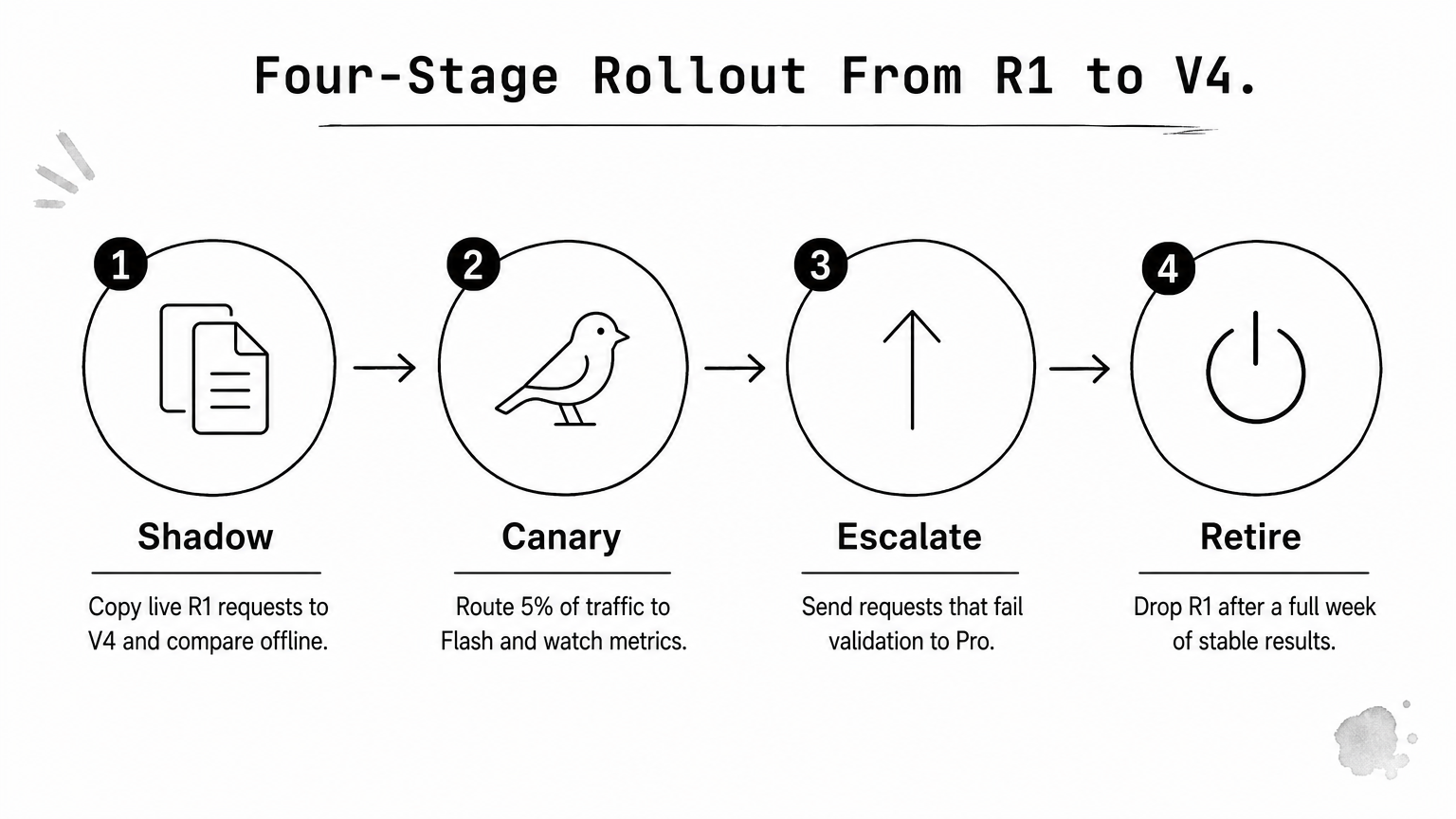
- Shadow: copy live R1 requests to V4 and compare outputs offline, without showing users.
- Canary: route 5% of real traffic to Flash and watch pass rate, latency, and output tokens.
- Escalate: send requests that fail validation to Pro instead of retrying on Flash.
- Retire: drop R1 after a full week where cost per task and failure rate hold.
Migrate behind a flag, measure on live traffic, and delete R1 only after the numbers hold.
Fix what usually breaks
Output handling causes most migration bugs. Parsers built around R1's reasoning trace may expect it in a specific field or format, so check how your provider returns thinking content for V4 and update the code that strips or logs it.
Prompts need a second look too. Habits that suited R1, such as skipping system prompts or avoiding few-shot examples, may no longer apply. Retest your prompts against the V4 variant you chose instead of carrying them over untouched.
Finally, confirm data handling before real user data flows. If you serve EU customers, check the provider's region options and retention policy. Geodd runs in US-EAST and EU-NORTH (Norway) with Zero Data Retention, which covers the questions most compliance reviews ask first.
Picking the right DeepSeek model
The DeepSeek R1 vs V4 decision comes down to cost per completed task, not rate cards or release dates. V4 Pro handles hard reasoning, coding, and long agent loops. V4 Flash covers high-volume traffic where latency matters. R1 stays only where a working pipeline has not yet justified the move.
Your own data settles the question. Build a test set from real requests, score each model on pass rate, tokens, and retries, then route by difficulty and roll out behind a flag. Delete R1 only after the numbers hold.
Ready to try it? Because the API is OpenAI-compatible, you can run DeepSeek V4 Flash on Geodd by changing the base URL and model name. Start your canary traffic there, and escalate failures to Pro when validation checks fail.