To run DeepSeek-V4-Flash NVFP4, download nvidia/DeepSeek-V4-Flash-NVFP4 from Hugging Face, which is about 145 GB. Put it on Blackwell GPUs with enough combined memory, then serve it with vLLM or SGLang using tensor parallelism. NVIDIA's model card verifies vLLM on four GB300 GPUs and gives an SGLang launch command for eight GPUs. A single DGX Spark does not have the memory for it.
The hard part is getting a clear picture before you pull 145 GB. The model has 284B parameters, but Hugging Face shows 167B. NVFP4 only works on Blackwell. SGLang needs a patch that may not be in your release yet. A DGX Spark has 128 GB of unified memory, which is less than the weights.
This guide covers the size and hardware requirements, then four steps: download, serve with vLLM, serve with SGLang, and test. At Geodd we run DeepSeek models behind an OpenAI-compatible API, so we also point out where self-hosting stops being worth it.
What DeepSeek-V4-Flash NVFP4 is and what it needs
DeepSeek-V4-Flash NVFP4 is NVIDIA's 4-bit quantized build of DeepSeek-V4-Flash. It needs Blackwell GPUs with roughly 145 GB of memory for the weights alone.
What NVIDIA changed
NVIDIA made the checkpoint with its Model Optimizer (v0.44.0) and published it under an MIT license. The base model is a Mixture-of-Experts design with 284B total parameters and 13B active per token. It supports a 1 million token context. Only the linear layers inside the MoE blocks are quantized to NVFP4. The remaining tensors stay in formats such as BF16 and FP8.
That narrow scope explains why quality barely moves. NVIDIA's own evaluation, run at temperature 1.0:
| Precision | GPQA Diamond | AA-LCR | τ²-Bench Telecom | SciCode | IFBench |
|---|---|---|---|---|---|
| Baseline | 0.894 | 0.658 | 0.943 | 0.481 | 0.788 |
| NVFP4 | 0.891 | 0.655 | 0.942 | 0.481 | 0.795 |
The NVFP4 build lands within 0.3 points of the baseline on four of five benchmarks and slightly ahead on IFBench.
Size and memory requirements
Plan for about 145 GB of weights, plus KV cache on top. The Hugging Face page lists 167B parameters because 4-bit values are packed two per byte, so the tensor count reads lower than the real 284B.
| Spec | Value |
|---|---|
| Total / active parameters | 284B / 13B |
| Weight memory | About 145 GB |
| Context length | 1M tokens |
| GPU | NVIDIA Blackwell |
| OS | Linux |
| Runtimes | vLLM, SGLang |
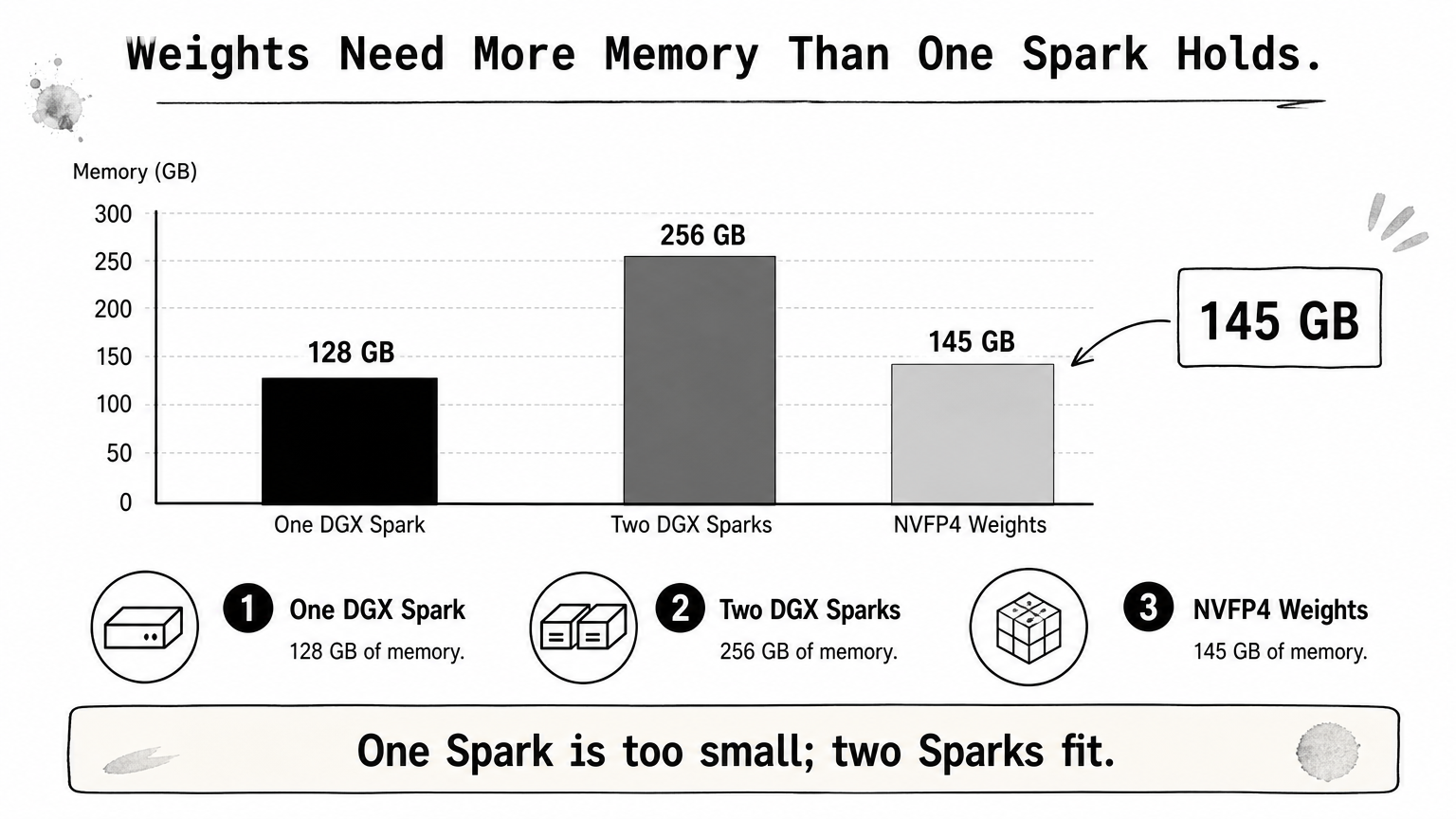
A DGX Spark has 128 GB of unified memory, so one unit cannot hold the weights. Two units give 256 GB combined. Community builders have run V4-Flash variants on two Sparks with tensor parallel 2. Those setups depend on patches that NVIDIA's model card does not validate.
One DGX Spark has 128 GB of memory, and this checkpoint's weights alone are about 145 GB.
Pick the right version
Three NVIDIA checkpoints exist, and they are not interchangeable:
nvidia/DeepSeek-V4-Flash-NVFP4: the one this guide covers.nvidia/DeepSeek-V4-Flash-0731-NVFP4: the quant of the official 0731 release.- A separate NVFP4 quant for DeepSeek V4.1 Flash.
Match the checkpoint to the model version your application was tested on. If you want V4.1 Flash without hosting anything, Geodd offers DeepSeek V4.1 Flash through its API.
Step 1. Download the NVFP4 checkpoint
Pull the repository with the Hugging Face CLI onto fast local storage with at least 200 GB free. That covers the roughly 145 GB of weights plus headroom.
Download with the Hugging Face CLI
Install the CLI and download straight into a local folder. Use NVMe if you can, because every restart reloads these files from disk. An interrupted download resumes when you rerun the command.
pip install -U huggingface_hub
hf download nvidia/DeepSeek-V4-Flash-NVFP4 \
  --local-dir ./DeepSeek-V4-Flash-NVFP4
Check what you pulled
Open hf_quant_config.json in the folder. It should list "moe_quant_algo": "NVFP4", which is how SGLang auto-detects the format. The folder should hold roughly 145 GB of safetensors files. A much smaller folder means the download was cut short.
The license is MIT, so commercial use is allowed. The card also says the model can reproduce biases from its web training data, so add your own guardrails before exposing it to users.
Confirm
hf_quant_config.jsonsays NVFP4 before you spend an hour on a failed launch.
Step 2. Serve it with vLLM
vLLM is the path NVIDIA verified. Launch nvidia/DeepSeek-V4-Flash-NVFP4 with --trust-remote-code, an FP8 KV cache, and a tensor-parallel size that matches your GPU count.
Launch with Docker
NVIDIA's card validates this on GB300 GPUs with the vllm/vllm-openai:nightly-aarch64 image (vLLM 0.22.1rc1.dev504) and tensor parallel 4. On x86 hosts, use the nightly tag for that architecture instead.
docker run --gpus all --ipc=host -p 8000:8000 \
  -v ~/.cache/huggingface:/root/.cache/huggingface \
  vllm/vllm-openai:nightly-aarch64 \
  nvidia/DeepSeek-V4-Flash-NVFP4 \
  --tensor-parallel-size 4 \
  --trust-remote-code \
  --kv-cache-dtype fp8
If you installed vLLM directly, the equivalent is vllm serve nvidia/DeepSeek-V4-Flash-NVFP4 with the same three flags.
What the flags do
| Flag | Purpose |
|---|---|
--tensor-parallel-size 4 | Splits the model across 4 GPUs. Set it to your GPU count. |
--trust-remote-code | Loads the custom DeepSeek V4 model code. |
--kv-cache-dtype fp8 | Stores the KV cache in 8 bits, which leaves more memory for long contexts. |
For tool calling and reasoning output, vLLM's recipe for the base model adds --tool-call-parser deepseek_v4, --enable-auto-tool-choice, and --reasoning-parser deepseek_v4. Try these on the NVFP4 checkpoint and test a tool call before relying on them.
Set tensor parallelism to your GPU count and keep the KV cache in FP8.
Step 3. Serve it with SGLang
SGLang also runs the checkpoint, but NVIDIA's card says it requires SGLang PR #25820. Check whether your release already includes that change before you launch.
Launch the server
SGLang reads the NVFP4 setting from hf_quant_config.json, so you do not pass a quantization flag. The card shows eight-way tensor parallelism:
python3 -m sglang.launch_server \
  --model nvidia/DeepSeek-V4-Flash-NVFP4 \
  --tensor-parallel-size 8 \
  --trust-remote-code
The server listens on port 30000 by default. Lower the tensor-parallel size only if your GPUs have enough combined memory for the weights plus cache.
Choose between vLLM and SGLang
Start with vLLM. It has a verified container image and a launch command that NVIDIA tested, so you hit fewer surprises. Choose SGLang if your stack already uses it and you can pin a build that contains the PR.
Both engines expose an OpenAI-style HTTP API, so your application code stays the same. You can test one engine, then switch by changing the base URL.
Use vLLM first, and switch to SGLang only when your stack already depends on it.
Step 4. Test the endpoint and tune it
Send one chat request to confirm the server works. Then test reasoning modes and context length, because those are where setups fail.
Send a test request
Point the OpenAI SDK at your server. Use port 8000 for vLLM or 30000 for SGLang.
from openai import OpenAI

client = OpenAI(base_url="http://localhost:8000/v1", api_key="not-needed")
resp = client.chat.completions.create(
    model="nvidia/DeepSeek-V4-Flash-NVFP4",
    messages=[{"role": "user", "content": "Write a Python function that merges two sorted lists."}],
    max_tokens=512,
)
print(resp.choices[0].message.content)
The model has three reasoning modes: Non-think for speed, Think High for logical analysis, and Think Max for full reasoning. Use Non-think for latency-sensitive chat and Think Max for hard math or coding. Check how your server exposes them.
Fix common problems
- Out of memory at load: add GPUs to the tensor-parallel setting, keep the FP8 KV cache, or lower
--max-model-len. - Architecture errors on H100 or H200: NVFP4 targets Blackwell. On Hopper, serve the base
deepseek-ai/DeepSeek-V4-Flash-0731model with eight-way tensor parallelism, as vLLM's recipe shows. - SGLang does not recognize the model: update to a build that includes PR #25820.
- Custom code errors: confirm
--trust-remote-codeis set.
If it loads on Blackwell and answers one prompt, your remaining work is memory tuning.
Where to go from here
You now have the full path. Download the NVFP4 checkpoint, confirm Blackwell hardware with about 145 GB of weight memory, serve it with vLLM, and test it through the OpenAI SDK. SGLang works as an alternative once your build includes the required patch.
Self-hosting makes sense when you control Blackwell capacity and need the weights in your own environment. If you only need the model's output, the hardware, the 145 GB download, and the tuning are overhead. You can call DeepSeek V4 Flash through Geodd's OpenAI-compatible API with the same SDK code from Step 4. You only change the base URL and key.