The best free OpenAI API alternative for most prototypes is the Google Gemini API free tier. It needs no card and works with OpenAI-style client code. Pick Groq if you want published limits and fast open-weight models such as gpt-oss-120b. Pick Ollama if you want unlimited local use on your own hardware. Everything else here is a variation on those ideas: a hosted free tier, a trial key, or a model you run yourself.
The problem is familiar. You built a bot on the OpenAI API, the trial credit expired, and a new key now starts at zero until you add prepaid funds. Reddit threads on this topic almost always start there. Lists of free OpenAI keys on GitHub do not solve it, because those keys get revoked quickly. No legitimate free OpenAI key exists, but several real alternatives do.
This article walks through seven free options, with the limits that matter, who each one suits, and how to switch your code. A comparison section shows what "free" means for each, and a final section covers what to do when free stops being enough. We run an inference API at Geodd, so we cover that step with real numbers.
1. Google Gemini API free tier
Google's Gemini API is the strongest free starting point for prototypes. The free tier is ongoing, it covers the Flash-class models, and you can get a key from Google AI Studio without adding a card.
What you get
Gemini Flash models sit close to what you would actually ship. A prototype built on them does not force you to rewrite prompts when you move to production. Gemini supports function calling, and Google documents OpenAI compatibility for its Python and JavaScript libraries.
To switch, change three values: the API key, the base URL, and the model name. The base URL is https://generativelanguage.googleapis.com/v1beta/openai/. Use the Flash model ID that AI Studio lists for your account.
The Gemini free tier is the closest thing to a free OpenAI replacement that you could realistically keep using after launch.
Limits and who it suits
Quotas vary by model and account. AI Studio shows them instead of publishing one fixed number, so check your own quota before designing around a request count. Expect the Pro tier to require billing. Data handling also differs between free and paid use, so keep customer data out of free-tier requests.
- Best for: prototypes, hackathons, and early product validation.
- Watch for: quotas that differ per model and can change.
- Skip it if: your prototype handles private user data.
2. Groq free tier
Groq gives you an ongoing free tier with published limits, which makes it the easiest hosted option to plan around. You know the ceiling before you write any code.
What you get
Groq serves open-weight models on its own hardware, including OpenAI's gpt-oss-120b and gpt-oss-20b. Generation is fast, which helps when you demo a chat interface or stream long answers.
The endpoint is OpenAI-compatible at https://api.groq.com/openai/v1, and the model ID for the larger model is openai/gpt-oss-120b. Because gpt-oss is OpenAI's own open-weight family, prompts you tune here carry over to any other host that serves the same model.
Groq trades a hard, published ceiling for predictability, and that is exactly what a prototype budget needs.
Limits and who it suits
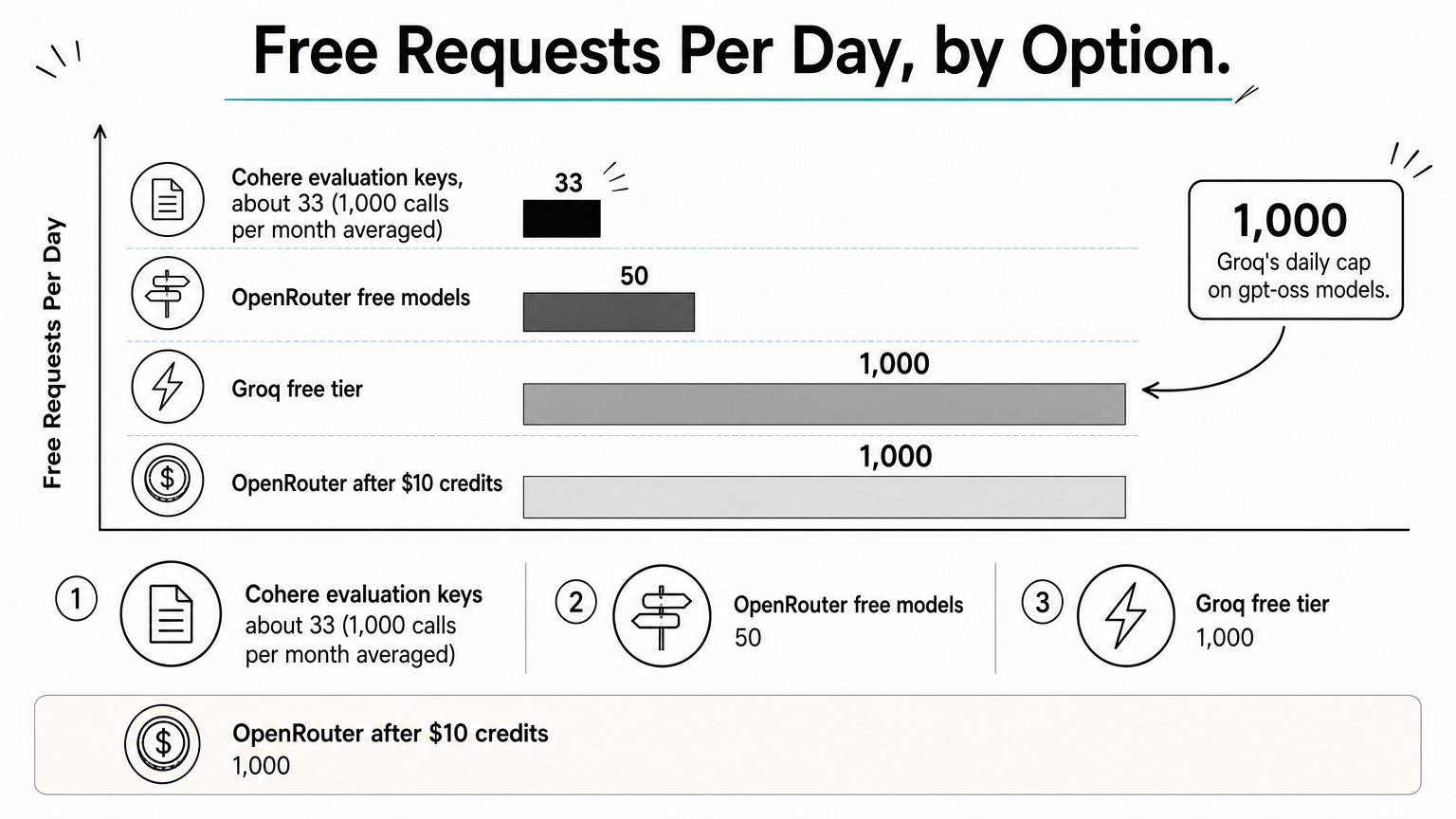
The free tier allows 30 requests per minute and 1,000 requests per day on the gpt-oss models. That sounds generous until you do the math. A demo with 50 users sending 20 messages each uses the entire daily allowance in one afternoon.
- Best for: backends that need predictable limits and quick responses.
- Watch for: the daily cap, which a small public demo can burn through.
- Skip it if: you need guaranteed capacity or closed models such as GPT or Claude.
3. OpenRouter free models
OpenRouter puts one OpenAI-compatible endpoint in front of many models, and a subset of them cost nothing. It is the fastest way to try several models without opening several accounts.
What you get
The base URL is https://openrouter.ai/api/v1. Free variants carry a :free suffix in the model ID. You keep one key and one client, and you swap models by changing a string.
The free lineup rotates over time. Do not hardcode one model name deep in your code. Keep the model ID in a config value, so a retired free model costs you a one-line change instead of a hunt through the codebase.
Treat OpenRouter's free list as a menu that changes, and keep the model name in config.
Limits and who it suits
Free models are capped at 50 requests per day. After you buy $10 in credits, the cap rises to 1,000 requests per day. Third-party providers serve these models and their logging policies differ, so read each model's page before sending anything sensitive.
- Best for: comparing several models quickly on the same prompts.
- Watch for: daily caps and changing availability.
- Skip it if: you need one stable free model for months.
4. Cohere evaluation keys
Cohere offers free evaluation keys and an OpenAI SDK compatibility API. It suits retrieval and tool-use experiments better than chat apps.
What you get
Cohere's Command models are built around retrieval-augmented generation, tool use, and long documents. The Compatibility API lets the OpenAI SDK call them, and it covers chat completions, function calling, and structured outputs.
That makes Cohere a good place to test a RAG pipeline end to end. You can check whether grounded answers with citations behave better than a general model before you commit to an architecture.
Cohere's free keys are for testing a retrieval idea, not for running an app.
Limits and who it suits
Evaluation keys allow 20 requests per minute and 1,000 API calls per month. That averages about 33 calls a day, so a chat demo will not survive it. Once you hit the cap, requests are rate-limited until the quota resets. These keys are meant for testing, not production.
- Best for: a weekend spike on RAG, reranking, or tool calling.
- Watch for: the monthly cap, which is the tightest on this list.
- Skip it if: you need an interactive chat demo with real users.
5. Puter.js
Puter.js removes the key problem entirely. You write no server code and hold no API key, and you pay nothing, because each user covers their own usage.
What you get
Puter calls this the "User-Pays" model. You add a JavaScript library to your frontend, call puter.ai.chat(), and the user's own Puter account pays for the usage. Puter's catalog includes OpenAI models and the open-weight gpt-oss family.
This works well for web apps and demos where you cannot afford to expose a key or absorb costs. It also removes a whole class of security mistakes, since no secret ships to the browser.
// npm install @heyputer/puter.js
import { puter } from '@heyputer/puter.js';

puter.ai.chat("Explain recursion in two sentences.", { model: "openai/gpt-oss-120b" })
    .then(response => puter.print(response));
With Puter.js, free for you means your users pay, so it only fits apps where that is acceptable.
Limits and who it suits
This is not a drop-in OpenAI SDK replacement. It lives in browser-side code, so backend jobs, cron tasks, and server agents do not fit. You also depend on a third-party platform and its model list.
- Best for: public web demos and side projects with no budget.
- Watch for: users needing a Puter account once they use AI features.
- Skip it if: your code runs on a server or must use the OpenAI SDK.
6. Ollama
Ollama is the simplest way to run open-weight models on your own machine. The only limit is your hardware, and your data never leaves your computer.
What you get
You install Ollama, pull a model, and it serves an OpenAI-compatible API at http://localhost:11434/v1. Your existing client code works if you point it at that URL and pass any placeholder string as the key. Pulling OpenAI's smaller open-weight model takes one command:
ollama pull gpt-oss:20b
This setup suits offline development and CI tests. You can run thousands of requests with no bill and no rate limit.
Ollama turns the free OpenAI API alternative question into a hardware question.
Limits and who it suits
The memory requirement is the real cost. gpt-oss-20b is designed to run within about 16 GB of memory, while the 120b model needs roughly an 80 GB GPU. Local models also trail the best hosted ones on hard tasks, and speed depends on your machine.
- Best for: private development, offline work, and free automated tests.
- Watch for: memory limits and slower generation on laptops.
- Skip it if: you plan to serve public traffic from a laptop.
7. LocalAI
LocalAI is an open-source server built as a drop-in replacement for the OpenAI API. Its strength is breadth: text, images, speech, and embeddings behind one local endpoint.
What you get
You self-host it, usually with Docker, and it listens on http://localhost:8080/v1 by default. Your OpenAI client code points there and keeps working. Teams often pick it when they use more than chat, such as embeddings for search plus text-to-speech and image generation.
Ollama and LocalAI overlap for text. The difference is scope. Ollama gives you the fastest text setup. LocalAI gives you one endpoint that mimics several parts of the OpenAI API.
Choose LocalAI over Ollama when you need more than chat behind one local endpoint.
Limits and who it suits
Setup is heavier than Ollama's. You manage models, updates, and configuration yourself. LocalAI can run on a CPU, but slowly, so a GPU matters for anything interactive. The software is free. The hardware and power are not.
- Best for: replacing several OpenAI endpoints locally at once.
- Watch for: more configuration work and model management.
- Skip it if: you only need local text chat and want the quickest start.
Free tier, trial credit, or local: how to pick
Pick a hosted free tier to prototype fast, a trial key only to test one feature, and a local model when privacy or unlimited volume matters. Two things get called "free" and only one really is: a free tier resets on a schedule, while trial credit is a one-time amount that runs out.
How the seven options compare
| Option | Type of free | Published limit | Runs where |
|---|---|---|---|
| Gemini API | Ongoing free tier | Model-specific quotas in AI Studio | Google cloud |
| Groq | Ongoing free tier | 30 requests/min, 1,000/day on gpt-oss models | Groq cloud |
| OpenRouter | Ongoing, free models | 50/day, 1,000/day after a $10 credit purchase | Cloud |
| Cohere | Evaluation keys | 20 requests/min, 1,000 calls/month | Cohere cloud |
| Puter.js | User-pays | No cap for you, users cover usage | Browser |
| Ollama | Self-hosted | Limited by your hardware | Your machine |
| LocalAI | Self-hosted | Limited by your hardware | Your machine |
For most readers the order is simple. Start on Gemini or Groq for a hosted prototype. Add Ollama when you want free, private testing. Use Puter.js only for browser apps.
Switching your code with a base URL change
Most options above speak the OpenAI format, so migration is usually three edits: the base URL, the key, and the model name. Here is the pattern with Groq:
from openai import OpenAI

client = OpenAI(
    base_url="https://api.groq.com/openai/v1",
    api_key="YOUR_PROVIDER_KEY",
)

response = client.chat.completions.create(
    model="openai/gpt-oss-120b",
    messages=[{"role": "user", "content": "Summarize this ticket in one line."}],
)
print(response.choices[0].message.content)
Test streaming, tool calling, and structured outputs after the switch. Basic chat migrates cleanly almost everywhere. The advanced features are where providers differ.
Compatibility means your request shape survives, not that every feature behaves the same.
When free runs out: low-cost open-weight APIs
When a free tier caps out, the cheapest step up is a pay-per-token API for open-weight models, and it often costs cents per month at prototype volume. Free tiers are built for testing, not for production traffic.
What a cheap paid step costs
Geodd serves open-weight text models through an OpenAI-compatible API, billed per token. Here are three current options, with a worked example of 10 million input tokens and 2 million output tokens in a month.
| Model | Input / 1M tokens | Output / 1M tokens | Monthly cost for the example |
|---|---|---|---|
| openai/gpt-oss-120b | $0.039 | $0.158 | $0.71 |
| GLM 5.3 Flash | $0.110 | $0.400 | $1.90 |
| DeepSeek V4.1 Flash | $0.300 | $1.100 | $5.20 |
The gpt-oss-120b figure comes from $0.39 for input plus $0.316 for output. GLM 5.3 Flash offers a 1.05M-token context window, while gpt-oss-120b offers about 131K tokens.
Why the move from free to paid is small
If you prototyped on Groq's free gpt-oss-120b, you can run the same model on a paid endpoint with only a base URL and key change. Your prompts and tool definitions stay as they are.
Data handling also matters once real users arrive. Geodd applies zero data retention by default and does not use API data for model training. Free tiers often differ on this point, so review the terms before you move customer data anywhere.
Prototype free, then pay pennies for the same model once real users show up.
Pick one free option and start building
For a hosted prototype, start with the Gemini free tier or Groq. For private, unlimited testing, run Ollama. Use OpenRouter to compare models, Cohere to test retrieval, LocalAI to cover images and speech locally, and Puter.js when your users can pay for their own usage. None of these replaces a production plan, but each removes the cost from the first weeks of building.
Switching is usually a base URL, a key, and a model name. Test streaming and tool calling right after you switch, and keep model IDs in config so a retired free model never breaks your app.
When your prototype outgrows its free limits, you can run GPT-OSS-120B through Geodd's OpenAI-compatible API and keep the same client code.