The best AI video generation API depends on what you are shipping. Geodd's Seedance 2.0 suits production apps that want multimodal reference inputs and per-token billing. Gemini Omni Flash suits apps built around conversational video editing. fal and WaveSpeedAI suit teams that want to try many models behind one key. Shotstack suits templated, high-volume videos, and Arcads suits AI-actor ads. A good pick has stable docs, a clear billing unit, an async job flow you can monitor, and a content policy that fits your product.
Most roundups still rank APIs that no longer exist. Google's docs say the Veo 3.1 Preview in the Gemini API has been shut down. OpenAI shut down its Sora 2 models and Videos API on September 24, 2026, and says no one-to-one replacement is available. Tutorials built on those endpoints will fail, so you need a current shortlist before you write any code.
Below are six options you can build on today. Each one gets the same breakdown: what it offers, who it suits, and how pricing and free access work. After the list, a short section covers what happened to Sora and Veo. A final section gives you a comparison table and the integration pattern that every video generation API shares. Geodd serves one of these options, so it comes first. Judge it by the same criteria as the rest.
1. Geodd Seedance 2.0 API
Geodd offers ByteDance's Seedance 2.0 video models through one API, so you can generate video next to text and image models without a second vendor.
What it offers
Seedance 2.0 is a professional-grade multimodal video model. You can guide a generation with reference inputs including images, videos and audio, not just a text prompt. Geodd lists three variants:
- Seedance 2.0 (
bytedance/dreamina-seedance-2.0): the full model. - Seedance 2.0 Fast (
bytedance/dreamina-seedance-2.0-fast): the same core functions with faster output. - Seedance 2.0 Mini (
bytedance/dreamina-seedance-2.0-mini): a cost-effective option for broader video creation needs.
You call them through serverless inference, which scales automatically. The same SDK also covers dedicated compute if your volume grows. Request examples live on the model pages, and a guide to getting Seedance 2 API access and your first video covers the setup.
Seedance 2.0 accepts images, videos and audio as references, so you steer a shot with more than words.
Who it suits
This fits teams that want one API and one SDK across text, image and video models. It also fits teams with data rules. Geodd does not use API data for model training. It does not store prompts, outputs or uploaded files unless you agree otherwise in writing.
Regions matter for compliance. Seedance is listed in Norway and Colombo, Sri Lanka, and EU customers get EU-hosted inference by default.
Pricing and free access
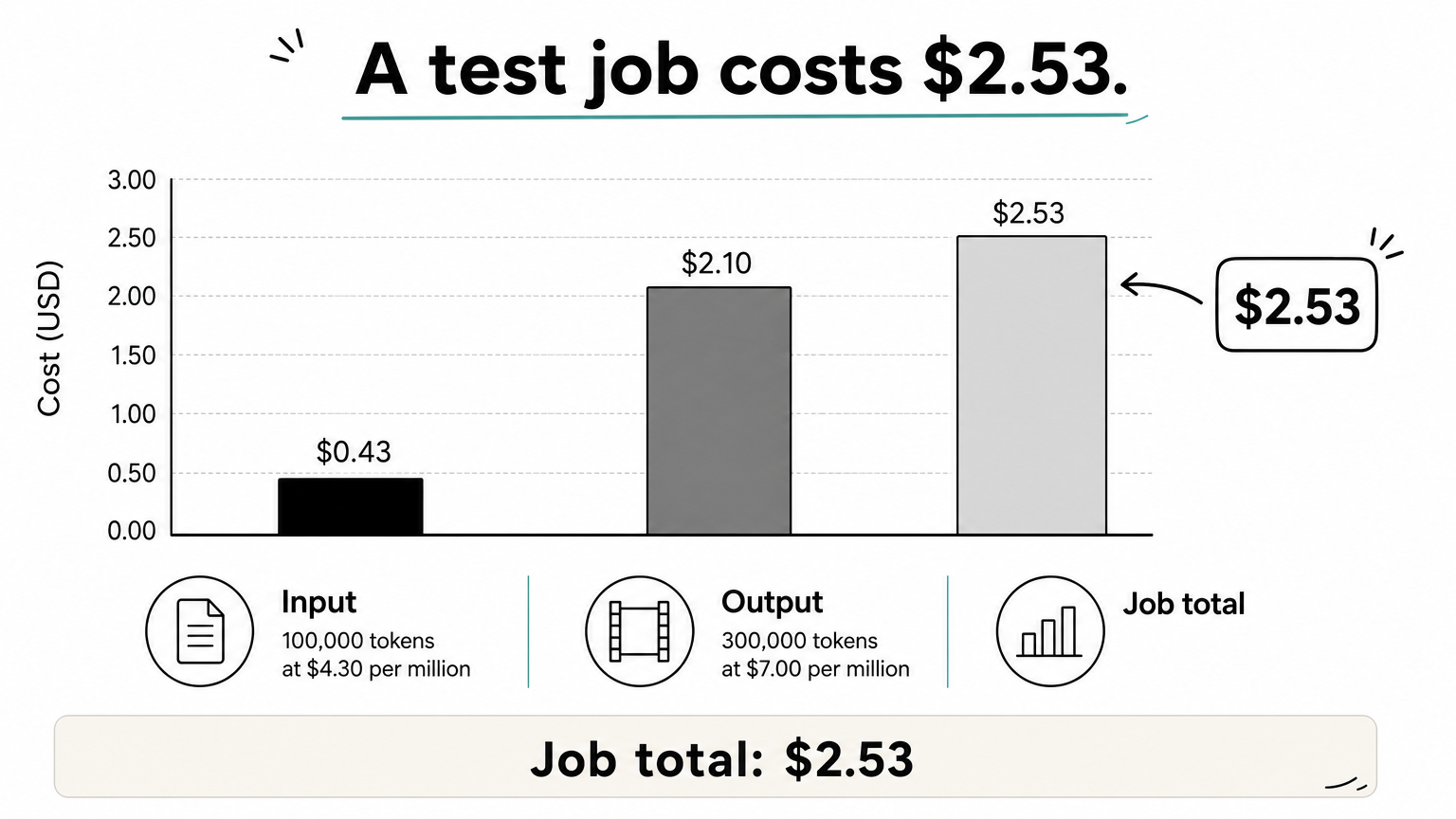
Billing is per token, not per second of video. Seedance 2.0 is listed at $4.30 per million tokens, with output at $7.00 per million. Here is a hypothetical job to show the arithmetic: 100,000 input tokens and 300,000 output tokens cost $0.43 plus $2.10, which is $2.53. Your real token counts depend on clip length, resolution and references, so run a test render and read the usage in the response.
Fast and Mini rates are on their model pages. For budgeting and current usage terms, see Geodd pricing.
2. Gemini Omni Flash
Gemini Omni Flash is Google's current model for video generation in the Gemini API, and it is the one Google's documentation tells you to use.
What it offers
Google describes it as a fast multimodal model that turns text prompts and images into short videos. It accepts text, image, audio and video inputs at the same time. It also keeps characters consistent across shots.
The standout feature is multi-turn editing through the Interactions API. You generate a clip, then ask for changes such as replacing an element or switching the perspective. The model refines the result instead of starting over.
Omni Flash treats video as a conversation, so you edit a clip with follow-up instructions instead of re-rendering from scratch.
Who it suits
Pick it if your product has an edit loop, such as a user typing "swap the car for a bike" after the first render. It also suits teams already on the Gemini API who want one key for text, vision and video. If you only need a batch of fixed clips from fixed prompts, the conversational layer adds little.
Pricing and free access
Rates and any free tier are set on Google's Gemini API pricing page and change by model, so read the Omni Flash entry before you budget. The Gemini API video guide is the starting point, and the Omni Flash guide has the request details. If you find an older Veo 3.1 Preview tutorial, skip it, because that preview is shut down in the Gemini API.
3. fal
fal is a hosted platform that exposes many video models through one developer API, which makes it a fast way to test an AI video generation API before you commit.
What it offers
fal describes its video offering as production-ready video from text, images and reference inputs through fast, scalable APIs. You pick a model from its catalog and call it with that model's parameters. New models show up on the platform as they are released, so you can try them without a new vendor contract.
Who it suits
It suits prototypes and products where the best model changes every few months. You can run the same prompt across several models and compare output side by side. The tradeoff is that each model has its own parameters, limits and price, so your code needs a thin adapter layer if you plan to switch models in production.
Pricing and free access
Pricing follows the model you choose, so there is no single fal rate. Open the model page, find the unit it bills (usually clip length or resolution), and multiply by your expected monthly volume.
With a multi-model platform, price each model separately, because the cheapest and best-looking model are rarely the same one.
Check the account dashboard for trial credits before you pay. Free video generation is rare because the compute is expensive, so plan on credits rather than unlimited use.
4. WaveSpeedAI
WaveSpeedAI is a gateway that puts several video models behind one API key, with Seedance and Kling families among its listed models.
What it offers
The pitch is a single key and a consistent request and response format across models. It provides SDKs, including Python, where a call is one function with a model name and a parameter dictionary. That keeps model switching cheap, and a batch loop over several prompts takes a few lines.
Who it suits
It suits developers who want to compare ByteDance's video models and others without managing separate accounts. Be careful with vendor claims. WaveSpeedAI says some models are exclusive to it in many regions, but that is its own marketing. Verify the availability and licensing terms for your country and your use case before you build on one model.
Pricing and free access
WaveSpeedAI bills per model, and its own comparison material quotes per-second figures. Those numbers were published for an earlier date, so treat them as dated. Pull the current rate from the model page and multiply by seconds of output.
The company says it offers free credits for testing. Confirm the amount in your dashboard, and run one short clip per model to see how much a real render costs. Budget from that measurement, not from a table in a blog post.
5. Shotstack
Shotstack is the odd one out. It is a programmatic video production API that combines AI-generated assets with your own media.

What it offers
Shotstack lets you combine AI voices, images and existing media into finished videos programmatically, and it positions itself as one API for the whole pipeline. You describe the video as structured data: clips, text, audio, timing. The service renders it. That makes output predictable, which a pure text-to-video model is not.
Who it suits
Use it for templated, data-driven video at volume: product promos, listing videos, personalized updates, social cutdowns. If you need photoreal original scenes from a prompt, pair it with a generative model and use Shotstack for assembly. If you need a cinematic one-off, it is the wrong tool.
If your videos follow a template, assemble them with an editing API and keep generative models for the shots a template cannot give you.
Pricing and free access
Check Shotstack's current pricing page for plan tiers and render allowances. Because you control the template, costs scale with the number and length of renders, not with how complex the prompt is. Look for a test environment before you commit, so you can validate templates without paying for every render.
6. Arcads
Arcads is built for one job: talking-head and actor-style video ads, delivered through an API.
What it offers
Arcads advertises a library of 1,000+ AI actors, plus lip sync and talking-avatar features. You supply a script, choose an actor, and receive a video of that person delivering it. The lip sync API can also match speech to a face, which is useful for localized versions of the same ad.
Who it suits
It fits performance marketers and affiliate teams producing many UGC-style creative variants quickly. It is a poor fit for story scenes, product shots without a presenter, or any product that needs free-form text-to-video. Think of it as a presenter engine, not a general video model.
Pricing and free access
Arcads publishes its own plans, so compare them against your variants per month. A fair test is to produce ten versions of one script with different actors and see the cost per usable ad. Whether a free trial exists is set by Arcads and can change, so confirm it on its site before you plan around one.
What happened to the Sora and Veo APIs
Neither API is a safe choice for a new build right now. Sora's Videos API is shut down, and Veo 3.1 Preview is shut down in the Gemini API.
The Sora API
OpenAI's documentation states that the Sora 2 models and Videos API were shut down on September 24, 2026, with no one-to-one replacement. Before the shutdown, the API offered sora-2 and sora-2-pro, generations of 16 and 20 seconds, and endpoints for extensions and edits. Its async create, poll, download flow became the template that other providers follow. The OpenAI deprecations page lists the affected models.
Veo in the Gemini API
Google's documentation says the Veo 3.1 Preview in the Gemini API has been shut down. Gemini Omni Flash is the recommended model for video generation there. Some older roundups still rank Veo 3.1 first, so check the publish date before trusting a ranking. Because no Veo rate is offered in the Gemini API, any Veo price you find in an article may describe an endpoint you cannot call.
Check the publish date of any video API tutorial before you copy code, because endpoints in this category disappear fast.
How to compare video APIs before you commit
Compare on four things: what the API generates, how it bills, how you integrate it, and what its policy blocks. A table keeps the first two visible.
Side-by-side comparison
| Option | Type | Billing basis | Strongest at |
|---|---|---|---|
| Geodd Seedance 2.0 | Hosted model API | Per token ($4.30 and $7.00 per million for 2.0) | Multimodal references, one API for text, image and video |
| Gemini Omni Flash | First-party model | Set on Google's pricing page | Conversational editing, character consistency |
| fal | Multi-model platform | Varies by model | Testing many video models |
| WaveSpeedAI | Multi-model gateway | Varies by model | One key across Seedance and Kling families |
| Shotstack | Programmatic editing API | Plan and render based | Templated, high-volume video |
| Arcads | AI actor API | Plan based | Presenter-style ad creative |
Free access and pricing models
Free video generation APIs are rare because rendering is expensive. Expect trial credits at best, and read the limits on resolution, length and watermarks. Billing units differ, so normalize them: convert everything to cost per usable ten-second clip. Tokens, seconds and render credits are not comparable until you measure a real job.
The integration pattern to design for
Video generation is asynchronous, so build for jobs, not responses:
- Submit a job with the prompt, duration, aspect ratio and any reference files. You get a job ID.
- Poll the job every 10 to 20 seconds with backoff, or register a webhook if the provider supports one.
- Download the file as soon as the job completes and copy it to your own storage. OpenAI's links expired after one hour, and other providers set their own limits.
- Handle failures and policy rejections as normal outcomes. Sora's API rejected real people and copyrighted characters, and other providers apply similar rules.
Read each provider's acceptable use policy before launch. Do not plan a product around content a provider may block.
Which API to start with
Start with the job your product does. If you want video generation next to your text and image models, with multimodal references and per-token billing, Seedance 2.0 is the cleanest fit. If your users edit clips in a back-and-forth, test Gemini Omni Flash. If you are still choosing a model, use fal or WaveSpeedAI to compare outputs. If your videos follow a template or feature a presenter, Shotstack and Arcads solve those jobs directly.
Whatever you choose, run one short test render first and measure its real cost. Sora and Veo Preview show how quickly a video endpoint can disappear, so keep your adapter layer thin.
To see which video, image and text models you can call through one API, browse Geodd's model catalog.