To use the GLM 5.2 API, create an API key with a provider that hosts the model, point any OpenAI-compatible SDK at that provider's base URL, and set the model ID to glm-5.2 (or the provider's own variant, such as z-ai/glm-5.2 on OpenRouter). Expect to pay roughly $0.20 to $1.00 per million input tokens and $3 to $4 per million output tokens at typical rates, with a wide spread between hosts. Free access exists only in limited forms: a web chat, starter credits, and rate-limited tiers.
The confusion comes from how many doors lead to the same model. Z.ai sells it directly, routers like OpenRouter list 26 hosts at different prices, and each host uses its own model ID. Listed input prices run from about $0.03 to $2.31 per million tokens. Subscriptions and "free" guides often point to a different model or a coding-tool plan, not an API you can build an app on.
This guide walks through the setup in four steps: choose a provider and read the price, create a key, send a first request, and then cut the bill or find free access. Geodd runs an OpenAI-compatible inference API with per-token pricing. The steps below work with any provider.
What the GLM 5.2 API gives you before you start
The GLM 5.2 API is a hosted, OpenAI-compatible endpoint for Z.ai's reasoning model, built for long coding and agent tasks. You send chat messages and get text back, with tool calling, JSON output and a context window of about one million tokens. Check the limits below before you pick a provider.
What GLM 5.2 supports
Yes, GLM has an API, and GLM 5.2 is its mid-2026 flagship text model. It was released on June 16, 2026. Z.ai's platform also lists streaming, context caching and a web search tool, though availability on third-party hosts varies. The specs are the same everywhere, but limits and extras depend on the host.
| Spec | GLM 5.2 |
|---|---|
| Release date | June 16, 2026 |
| Context window | 1,048,576 tokens (about 1M) |
| Modalities | Text in, text out |
| Reasoning effort | high and xhigh (xhigh maps to max) |
| Tool calling | Yes, OpenAI-style tools |
| Structured output | JSON schema through response_format |
| Weights | Open, MIT license, 744B mixture-of-experts |
What you need on hand
Gather a few things first so the later steps take minutes, not an afternoon.
- An account with one provider, plus a card or prepaid balance.
- Python 3.9+ with the
openaipackage, or Node with theopenaipackage, or justcurl. - A secrets manager or at least an environment variable for the key.
- A rough monthly token estimate: input tokens and output tokens separately.
GLM 5.2 or a newer GLM
GLM 5.3 is already out, and OpenRouter describes it as an improvement on GLM 5.2 in coding and token efficiency. Its reasoning is always on, with low, high and max efforts. If you are starting a new project, test 5.3 too. If your prompts and evals already pass on GLM 5.2, stay on it and keep the version string pinned.
Pin the exact model ID in your code, because "GLM 5.2" and "GLM 5.3" are different endpoints with different prices.
Step 1. Choose a provider and check the price
Pick the provider by three things: the base URL and model ID you need, the per-token price, and any region or data rule you must meet. The comparison below covers the routes that serve GLM 5.2.

Where you can call GLM 5.2
| Route | Base URL | Model ID | Pick it when |
|---|---|---|---|
| Z.ai direct | https://api.z.ai/api/paas/v4/ | glm-5.2 | You want first-party access and the maker's own limits |
| OpenRouter | https://openrouter.ai/api/v1 | z-ai/glm-5.2 | You want one key, 26 hosts and automatic failover |
| Inference hosts (Together AI, Fireworks, NVIDIA's hosted catalog) | Per host | Per host page | You already have an account there |
| Geodd | On the model page | On the model page | You want OpenAI-compatible, per-token pricing and no storage of prompts or outputs by default |
OpenRouter lets you choose a routing mode: Balanced for price and speed, Nitro for fastest, Floor for cheapest. If you need EU data residency there, its in-region routing needs a Business or Enterprise plan and serves GLM 5.2 only from European hosts. Z.ai also sells a GLM Coding Plan from $18 a month, but it is meant for AI coding tools, so check its terms before pointing an application at it.
What GLM 5.2 API pricing looks like
Prices differ a lot by host. OpenRouter's provider list shows input rates from about $0.03 to $2.31 per million tokens and output rates from about $0.59 to $8.00, with "fast" tiers at the expensive end. The weighted average customers actually pay there is $0.2116 per million input tokens and $3.548 per million output tokens. Z.ai's own pay-as-you-go rate is around $0.95 input and $3 output at the time of writing, so confirm it on Z.ai's pricing page before you budget.
Here is one worked example. An agent uses 50 million input tokens and 10 million output tokens a month.
| Rate scenario | Input rate | Output rate | Monthly cost |
|---|---|---|---|
| OpenRouter weighted average | $0.2116 | $3.548 | $46.06 |
| Z.ai pay-as-you-go | $0.95 | $3.00 | $77.50 |
| A common mid-tier host rate | $1.40 | $4.40 | $114.00 |
The math is input millions times the input rate, plus output millions times the output rate. For the first row, 50 × 0.2116 = $10.58 and 10 × 3.548 = $35.48. Reasoning tokens bill as output, so a model on max effort can cost more than the visible reply suggests. For Geodd's current GLM 5.2 rate, use the model page rather than a screenshot of a rate card.
Compare providers on input and output rates together, because a cheap input price with an $8 output price can cost more than a balanced one.
Step 2. Create your GLM 5.2 API key
You create a GLM 5.2 API key in the provider's dashboard, copy it once, fund the account, and store it outside your code. The flow takes about five minutes on any host.
Get a key from Z.ai
Z.ai is the shortest path if you want the model maker's own endpoint.
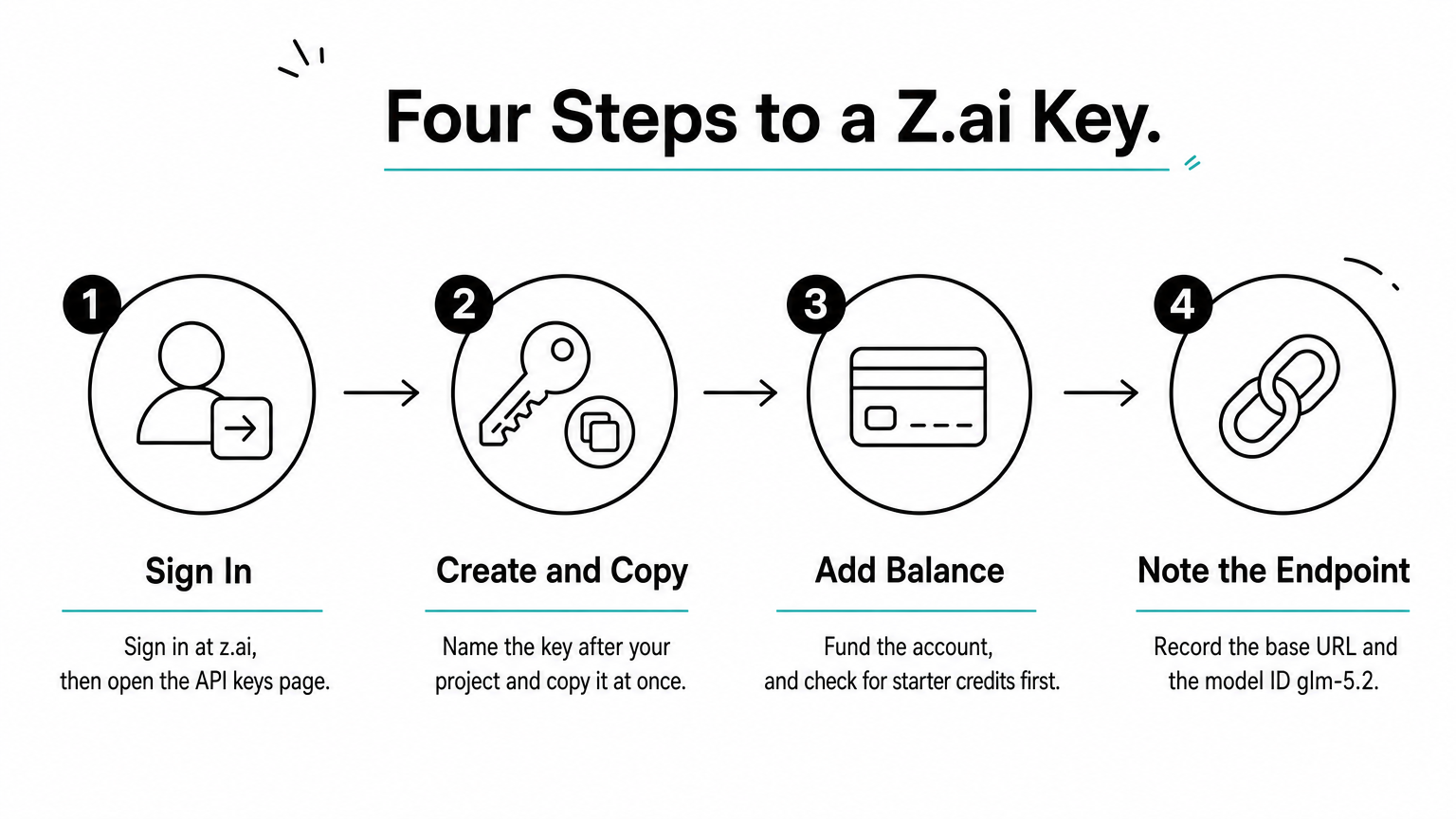
- Sign in at z.ai and open the API keys page (
z.ai/manage-apikey/apikey-list). - Click create, name the key after the project, and copy it immediately.
- Add a balance. Some new accounts show starter credits, so check your balance before paying.
- Note the base URL
https://api.z.ai/api/paas/v4/and the modelglm-5.2.
Get a key through a router or another host
OpenRouter issues one key that reaches all of its GLM 5.2 hosts. Create the key in your dashboard, add credit, and use the slug z-ai/glm-5.2. On Geodd, create a key in your account and copy the model ID and base URL from the GLM 5.2 model page. Other hosts follow the same pattern, but the model ID is rarely identical, so copy it from the host's own model page instead of guessing.
Store the key safely
Put the key in an environment variable, never in source control or browser code.
export ZAI_API_KEY="your-key-here"
export OPENROUTER_API_KEY="sk-or-v1-..."
Use a separate key per environment, set a spend limit if the dashboard offers one, and rotate the key if it ever lands in a log or a commit. A leaked GLM key gets abused fast because long-context calls are expensive.
One key per project and per environment means a leak costs you one rotation, not a rebuild.
Step 3. Send your first GLM 5.2 API request
Your first request is a standard chat completion with two values swapped: the base URL and the model ID. Any OpenAI SDK works, so you do not need a Z.ai-specific library.
Make the call with the OpenAI SDK
This Python example uses Z.ai. To use OpenRouter, change the base URL to https://openrouter.ai/api/v1, the model to z-ai/glm-5.2, and the key variable.
import os
from openai import OpenAI

client = OpenAI(
    api_key=os.environ["ZAI_API_KEY"],
    base_url="https://api.z.ai/api/paas/v4/",
)

response = client.chat.completions.create(
    model="glm-5.2",
    messages=[{"role": "user", "content": "Explain a mutex in two sentences."}],
    max_tokens=1024,
)
print(response.choices[0].message.content)
To test without an SDK, run a streaming call with curl. Streaming shows time to first token, which tells you more about a host than a full response does.
curl -N https://api.z.ai/api/paas/v4/chat/completions \
  -H "Content-Type: application/json" \
  -H "Authorization: Bearer $ZAI_API_KEY" \
  -d '{
    "model": "glm-5.2",
    "stream": true,
    "messages": [{"role": "user", "content": "Hello"}]
  }'
Add tools, JSON output and reasoning effort
GLM 5.2 accepts the OpenAI tools and tool_choice fields for function calling. It also supports a JSON schema in response_format, which is the reliable way to get parseable output. Reasoning effort is set differently per host. OpenRouter uses a reasoning object, so read your provider's parameter docs before you set effort. Start at high for coding agents, and move to xhigh only when evals show a gain.
Fix the common errors
| Symptom | Likely cause | Fix |
|---|---|---|
| 401 Unauthorized | Wrong key, or key for another provider | Match the key to the base URL |
| 404 or model not found | Model ID from a different host | Copy the ID from your host's model page |
| 429 | Rate limit or empty balance | Add credit, back off, retry |
| Empty or cut-off reply | Reasoning tokens used up max_tokens | Raise max_tokens |
Most failed first calls come from a mismatched base URL, key or model ID, so check those three before anything else.
Step 4. Cut costs and find free GLM 5.2 API access
Free GLM 5.2 API access is limited, and the cheapest paid route is often a different host or a smaller model. Work through free options first, then caching and effort, then alternatives.
Free ways to try GLM 5.2
The cleanest free route is the web chat at chat.z.ai, which needs no key and suits prompt testing. Z.ai's API platform may give new accounts starter credits, so check yours. Some walkthroughs run GLM 5.2 through Cloudflare Workers AI, which lists the model, but its free allocation and limits change, so check its dashboard.
Be careful with "free GLM" claims. The free OpenRouter model, z-ai/glm-4.5-air:free, is GLM 4.5 Air, not GLM 5.2, and it is rate-limited. The Coding Plan from $18 a month is paid. For anything beyond testing, plan to pay per token.
Lower the bill on GLM 5.2
Four changes cut cost without changing models.
- Order prompts for caching. Put the long, stable part (system prompt, repository context) first. Cache-read rates sit well below standard input rates. One listing shows $0.26 against $1.40.
- Lower reasoning effort on simple steps, since reasoning tokens bill as output.
- Cap
max_tokensso a runaway answer cannot bill you for 100K tokens. - Use Floor routing on OpenRouter if you only care about price, or compare providers by throughput if latency matters.
When another model is cheaper
If your task does not need GLM 5.2's long-horizon coding strength, a lighter model can cost a fraction as much. Here are Geodd's current text models on the same 50M input, 10M output workload.
| Model | Input / 1M | Output / 1M | Context | Monthly cost |
|---|---|---|---|---|
| GLM 5.3 Flash | $0.110 | $0.400 | 1.05M | $9.50 |
| DeepSeek V4.1 Flash | $0.300 | $1.100 | 1.05M | $26.00 |
| GPT-OSS-120B | $0.039 | $0.158 | 131.07K | $3.53 |
The GLM 5.3 Flash endpoint has a 128K maximum output, runs in US-EAST and keeps zero data retention by default. Those are different models, not drop-in replacements, so run your own evals before switching. GPT-OSS-120B's context is much shorter than GLM 5.2's, which rules it out for million-token jobs.
Running the open weights yourself
GLM 5.2 does not run on a laptop. The weights are public on Hugging Face under zai-org, but the model has 744B parameters. At 8-bit precision the weights alone take about 744 GB before KV cache, so you need a multi-GPU server. Unless you have steady, high volume, paying per token is cheaper than renting bare-metal GPU servers.
Treat "free" as a way to test GLM 5.2, and treat per-token pricing, caching and model choice as how you control cost in production.
Your next step
The setup comes down to four moves: pick a provider whose base URL and model ID you have confirmed, create a key and store it as an environment variable, send one streamed chat completion, and then tune cost with caching, lower effort and a model that fits the task. Price is the part that varies most, so run your own token counts through two or three hosts before you commit.
If you want an OpenAI-compatible endpoint with per-token pricing and no storage of your prompts or outputs by default, open the GLM 5.2 model page on Geodd for current pricing, context limits and SDK examples.