The best AI agents platform depends on who builds the agent. If nobody on your team writes code, start with a no-code builder such as Gumloop or Make. If your developers write the agent logic, pair a workflow tool like n8n with an inference API such as Geodd that serves the models. If you work in a regulated industry or a large enterprise, look at StackAI or CrewAI. Claude is the easiest starting point for one person, and Zapier suits teams that already automate everything there.
The hard part is that "platform" covers very different products. Some sell a visual canvas, some sell a framework, and some sell the models that do the reasoning. A list that ranks them on one scale ends up comparing a drag-and-drop builder to a GPU-backed API, which helps nobody.
This article sorts eight options by what they actually do and judges each one on the same four points: how it works, who it suits, what it costs, and where it falls short. Geodd is our own product, so you should know where it fits. It is the inference layer, not a visual builder. It comes first because every agent written in code needs a model API, and I say plainly when it is the wrong choice.
How to choose an AI agents platform
Choose by separating the builder from the model layer, then check six practical points: model access, integrations, pricing unit, autonomy, data handling, and hosting. Most bad purchases come from skipping this split and buying a canvas when the real problem was reliable, affordable model calls.
What counts as an AI agent platform
An AI agent platform is software for building, running, and managing programs that take a goal, call a language model, use tools, and act on the result. Classic automation follows fixed "if this, then that" steps. An agent decides its own next step, so it can handle messy inputs such as a support email or a half-finished spreadsheet.
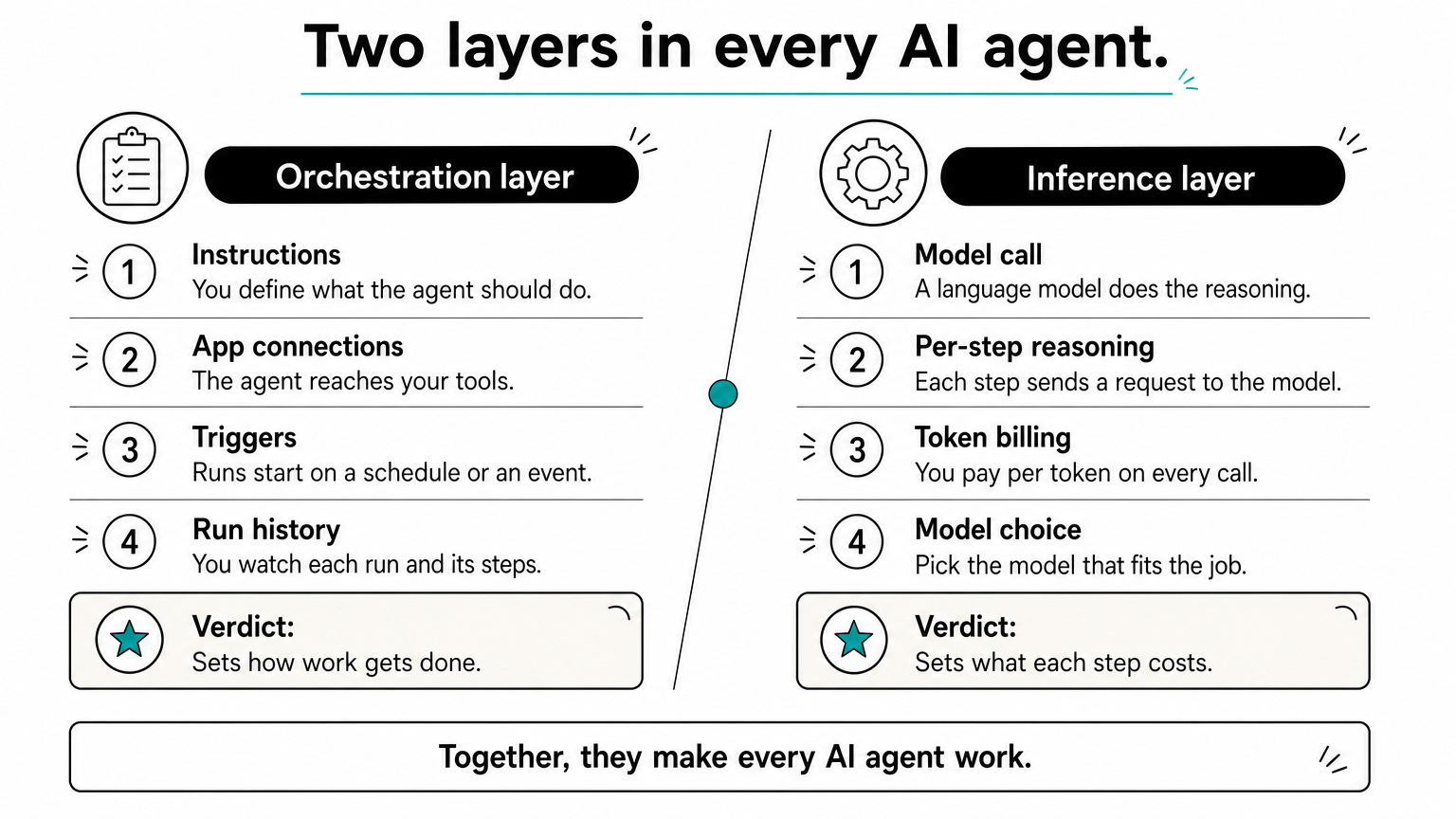
Every agent has two layers. The orchestration layer is where you define instructions, connect apps, set triggers, and watch runs. The inference layer is the model API that does the reasoning on each step. Some products bundle both, while others give you only one.
- Bundled: Gumloop includes model access, so you do not paste in API keys.
- Builder only: n8n expects you to bring your own model keys.
- Inference only: Geodd serves models through an API and leaves the agent logic to you.
Pick the builder for how your team works, and pick the model layer for what each run costs and where your data goes.
Six checks before you commit
Run every candidate through the same six checks. A platform that fails one of them usually costs you a migration later.
- Model access. Can you choose the model, or are you locked to one vendor? Open-weight models are often far cheaper per token.
- Integrations. Does it connect to the apps your team already uses, directly or through MCP servers?
- Pricing unit. Credits, workflow executions, runs, and tokens are not interchangeable. One agent run can burn many credits.
- Autonomy. Can agents run on a schedule or a trigger, and can you require human approval for risky actions?
- Data handling. Check whether your data trains models, how long prompts are kept, and which regions process them. Look for GDPR or SOC 2 statements if you need them.
- Hosting and exit. Can you self-host, and can you move your prompts and tools elsewhere?
Run a one-week pilot with a real task before you pay for a team plan. Count how many credits or tokens one complete run uses, then multiply by your expected volume. That number tells you more than any pricing page.
1. Geodd: the inference layer for agents you code
Geodd is the right first pick when your team writes its own agents and needs a fast, steady model API underneath them. It is not a drag-and-drop builder, and it does not ship an integrations library.
What it is and how it works
Geodd is an AI inference company that has operated since 2023. It offers serverless inference and dedicated GPU deployments through one SDK, and the API is OpenAI-compatible. If your agent already uses the OpenAI SDK, you switch providers by changing the endpoint and key, not by rewriting code.
Behind the API, Geodd uses AI agents and hardware-specific models to write and refine kernels for inference bottlenecks. Improvements that pass verification are deployed into serving automatically. For you, the goal is steady latency on long agentic runs, which means fewer timeouts and fewer retried steps.
Who it suits
Geodd suits developers and ML platform teams that build agents in code with any framework that accepts an OpenAI-compatible endpoint. It also suits teams moving off another hosted provider or off self-hosted GPUs, because migration is mostly a configuration change. Pair it with a builder like n8n if you want a canvas on top.
Data handling is a second reason to choose it. Geodd does not use API data for model training, and it does not store prompts, outputs, or uploaded files unless separately agreed in writing. The models listed below also state zero data retention by default. The company is GDPR ready, and its SOC 2 compliance is pending.
If your agent is written in code, the model API is the platform decision that sets both your bill and your reliability.
Pricing
Inference is priced per token, and dedicated setups are priced on a flexible basis. The three text models most agent teams ask about are below. Prices are per 1M tokens as published on each model page.
| Model | Input | Output | Context | Typical agent day* | 30 days |
|---|---|---|---|---|---|
| GLM 5.3 Flash | $0.110 | $0.400 | 1.05M | $0.30 | $9.00 |
| DeepSeek V4.1 Flash | $0.300 | $1.100 | 1.05M | $0.82 | $24.60 |
| GPT-OSS-120B | $0.039 | $0.158 | 131.07K | $0.11 | $3.29 |
*Example workload: 2M input tokens and 200K output tokens per day. For GLM 5.3 Flash that is 2 × $0.110 + 0.2 × $0.400 = $0.30. For DeepSeek V4.1 Flash it is 2 × $0.300 + 0.2 × $1.100 = $0.82. For GPT-OSS-120B it is about $0.11. Swap in your own token counts to estimate your bill.
Strengths and limits
Geodd's strengths come from its focus on the model layer. Its limits come from the same place.
- Strength: an OpenAI-compatible API with serverless and dedicated options under one SDK.
- Strength: very low per-token prices on open-weight models, with large context windows on GLM 5.3 Flash and DeepSeek V4.1 Flash.
- Strength: DeepSeek V4.1 Flash allows up to 384K output tokens, which helps with long code generation.
- Limit: no visual builder, no app connectors, and no scheduling. You supply the agent code.
- Limit: regions are set per model. GLM 5.3 Flash and DeepSeek V4.1 Flash list US-EAST, so confirm the model page if you need EU processing.
- Limit: Seed 2.0 Pro and Seed 2.1 Turbo list streaming as unavailable, which matters for chat-style agents.
2. Gumloop: the easiest no-code agent builder
Gumloop is the best pick for non-technical teams that want to build agents by describing them in plain language. It bundles the model access, so you can start without separate API accounts.
What it is and how it works
Gumloop is a no-code platform built around agents. You give an agent access to your tools, choose a model, write instructions, and then chat with it to assign work. A built-in assistant called Gummie helps you build agents by conversation.
Under the hood you also get nodes, flows, and subflows for fixed workflows, plus MCP server connections and built-in integrations. You can tag an agent in Slack and have it run a task there, such as finding blog posts with an outdated year in the title and updating them in your CMS.
Who it suits
Gumloop suits marketing, sales, support, and operations teams without engineers. It also suits freelancers and agencies that want to ship agents quickly. Larger companies can use its enterprise tier, which adds role-based access control, SAML and SCIM support, audit logs, and custom data retention.
It is a weaker fit if you need to self-host or if you want a large community template library. Developers who want total control will find a code-first stack more flexible.
Gumloop wins when the person building the agent is the person who needs the result.
Pricing
Gumloop offers a free plan and paid plans that start at $37 per month. Usage is metered in credits, and published credit allowances for the entry plan differ between sources, so check the current pricing page before you budget. Higher tiers add team features, and enterprise pricing is custom.
Model access is built in, but the paid plans also let you bring your own API key. That option can help if you already have negotiated rates with a model provider.
Strengths and limits
Gumloop is quick to learn and broad in what it can do, though its ecosystem is still young.
- Strength: building an agent feels like chatting with an assistant.
- Strength: model access included, plus MCP server support.
- Strength: a free plan to test with before you enter a card.
- Limit: a smaller template ecosystem than older automation tools.
- Limit: organizing agents across workspaces confuses some new users at first.
3. n8n: full control for technical teams
n8n is the best choice for technical teams that want a visual workflow builder they can self-host. It rewards people who understand APIs and punishes those who do not.

What it is and how it works
n8n gives you a canvas where you drag in apps, connect them with logic, and add model nodes. Agents are one kind of node inside a larger workflow, so you can mix deterministic steps with model-driven ones. A large template library means you rarely start from a blank canvas.
You bring your own model keys. That is a feature if you want to point nodes at any OpenAI-compatible endpoint, including an inference provider like Geodd. It also means model spend shows up on a separate bill.
Who it suits
n8n suits IT operations, DevOps, security operations, and engineers who want low-code speed without giving up control. It is especially strong for teams that must keep data inside their own infrastructure, because it can be self-hosted.
Sales and marketing teams can use it too, but only if someone technical builds and maintains the workflows. A non-technical team working alone will hit the learning curve quickly.
n8n is the pick when control and self-hosting matter more than how fast a beginner can ship.
Pricing
n8n's hosted plans meter usage by workflow executions. Published plan details list these tiers:
- Starter: $24 per month, 2.5K executions, unlimited steps.
- Pro: $60 per month, 10K executions, more shared projects and admin roles.
- Business: $800 per month, 40K executions, self-hosted, with SSO and version control.
- Enterprise: custom pricing.
Self-hosting is the usual route to avoid per-execution fees, but you then pay in server time and maintenance. Model costs are separate in every case.
Strengths and limits
n8n offers more flexibility than most no-code tools, at the cost of polish.
- Strength: self-hosting for security-focused teams.
- Strength: wide integrations and a deep template library.
- Strength: any model works if you have an API key.
- Limit: a steep learning curve for non-technical users.
- Limit: the interface can feel crowded.
- Limit: heavy AI use adds a separate model subscription or API bill.
4. Make: affordable visual automation with agents
Make is the best budget pick for freelancers and startups. It started as a visual automation tool and now adds goal-driven agents on top.
What it is and how it works
Make (formerly Integromat) lets you build "scenarios" on a visual canvas by linking apps and model calls. Its AI Agents feature adds goal-driven behavior, so an agent can handle edge cases that you did not map out as separate branches.
The platform lists more than 3,000 pre-built app integrations. It connects to major models including OpenAI, Claude, Gemini, and Mistral, so you can wire models into the apps your business already runs on.
Who it suits
Make suits solo operators, small agencies, and startups that want lots of connectors at a low monthly price. It is also a reasonable step up from a basic automation tool when you want to add a model without learning a new paradigm.
It is less suited to deep multi-agent systems. If your agents must coordinate and be tracked as a group, a dedicated agent platform fits better.
Make is where you go when integrations and price matter more than agent sophistication.
Pricing
Make has a free plan with 1,000 credits and paid plans that start low. Published monthly prices are:
- Free: $0 for 1,000 credits.
- Core: $10.59 for 10,000 credits.
- Pro: $18.82 for 10,000 credits, with priority scenario execution.
- Teams: $34.12 for 10,000 credits, with team roles.
- Enterprise: custom pricing.
Credits get consumed per operation, so a scenario with many steps and model calls uses them faster than the headline numbers suggest. Test a typical scenario before choosing a tier.
Strengths and limits
Make gives you breadth and a low entry price.
- Strength: a visual builder where you can see each step.
- Strength: a very large connector library.
- Strength: among the cheapest paid plans in this list.
- Limit: agent features are newer than its core automation engine.
- Limit: credit-based billing can be hard to forecast for complex scenarios.
5. Zapier: proven automation with an Agents add-on
Zapier is best for business owners who want AI added to an automation platform they already trust. Its agent features are newer than its core product.
What it is and how it works
Zapier connects apps with triggers and actions, and you can place model steps inside those automations. Its Agents add-on goes further. You give an agent instructions and tools, and it works toward a goal instead of running a fixed chain.
The main draw is the integration library. Whatever tool your business uses, Zapier probably connects to it, and there is a huge amount of documentation online.
Who it suits
Zapier suits operations managers and business owners who want predictable, battle-tested plumbing. If you already run dozens of Zaps, adding an agent step is far less work than moving to a new platform.
It suits teams that want an agent platform less well. Zapier grew from automation, so some AI features can feel bolted on rather than central.
Zapier is a strong second layer for people who already live in it, and a weaker first choice for people who do not.
Pricing
Zapier has two pricing structures. Core automation has a free plan, and paid plans start at $29.99 per month for the Professional tier, with higher Team and Enterprise tiers. The Agents add-on is priced separately:
- Free: $0, 400 activities per month.
- Pro: $50 per month, 1,500 activities per month.
- Enterprise: custom pricing.
Budget for both, because an agent that triggers Zaps spends from each allowance.
Strengths and limits
Zapier is dependable and widely supported, but it is not AI native.
- Strength: the broadest set of app connections and a mature ecosystem.
- Strength: straightforward to use, even for complex tasks.
- Limit: agents are an add-on to existing plans, not the core product.
- Limit: costs stack when you use both the automation plan and the Agents plan.
6. Claude: the quickest way to start with agents
Claude is the best starting point for an individual or small team that wants agent behavior with almost no setup. It is an assistant first and an agent builder second.

What it is and how it works
Claude is Anthropic's assistant, and it has grown into a capable agent. In the chat product you create Projects with custom instructions and add Skills or MCP connectors to reach other tools. For developers, Claude Code runs agent-style work in a terminal or an editor.
A common pattern is to write a detailed instruction set for a recurring job, such as auditing a content library, and reuse it in the same project each time. For jobs that need your CMS or another system, MCP connectors let Claude act there directly.
Who it suits
Claude suits founders, marketers, analysts, and developers who want to use agents at work today. It is a good first step because there is nothing to deploy. You learn what agents can and cannot do before you commit to a platform.
It is a poor fit when you need to ship an agent to customers, run it on a schedule without a person, or choose among many models. For those jobs, pair it with a builder or move to a dedicated platform.
Claude teaches you what agents can do, and a builder or inference API is where you turn that into a product.
Pricing
Claude has a free plan. Published paid plans are:
- Pro: $17 per month billed annually, or $20 billed monthly. Adds more usage, Claude Code access, unlimited projects, and remote MCP connectors.
- Max: from $100 per month, with 5x or 20x more usage than Pro.
Heavy daily users commonly hit usage limits on Pro. That is the main reason people move up to Max.
Strengths and limits
Claude is easy to adopt, but it is mainly a single-vendor assistant.
- Strength: minimal setup and a free tier.
- Strength: Projects, Skills, and MCP connectors for repeatable agent work.
- Limit: you use Claude models only.
- Limit: it is not built for multi-user agent deployment or customer-facing apps.
- Limit: usage limits arrive quickly for power users.
7. CrewAI: multi-agent systems for large enterprises
CrewAI is best for enterprise teams building systems where several agents coordinate. It is not meant for a first agent or a small budget.
What it is and how it works
CrewAI is a multi-agent platform with a framework and a UI Studio. You define "crews" of agents, either by writing code or starting from templates, then deploy them to production and generate an interface for your colleagues.
It connects to enterprise tools such as Box, HubSpot, and AWS. It also lets you track agent performance and progress, so you can see where a run breaks and improve the crew over time.
Who it suits
CrewAI suits large organizations and consulting firms that want a full path from build to deployment with monitoring. Teams of this size tend to have developers, security reviews, and budgets for a sales-led purchase.
If you are a startup, an agency, or a solo builder, the setup is probably more than you need. An agent builder with a free plan or a simple code stack will get you to a working agent faster.
CrewAI pays off only when you are coordinating many agents across many teams.
Pricing
CrewAI does not list prices publicly. You book a demo and receive a quote based on your needs. That makes it hard to compare with the other options on cost alone, and you should treat it as an enterprise purchase.
Ask the sales team how usage is metered, what support is included, and whether model costs are bundled or billed separately. Those three answers decide the real price.
Strengths and limits
CrewAI is built for agents from the start, which shows in its features and its price opacity.
- Strength: designed around multi-agent systems.
- Strength: performance tracking and iteration on deployed crews.
- Strength: connectors for enterprise tools.
- Limit: no public pricing and a sales call is required.
- Limit: more complex setup than simple builders.
- Limit: likely overkill for small teams.
8. StackAI: an enterprise builder for regulated industries
StackAI is best for companies in finance, legal, insurance, government, or education that need security controls and a visual builder. It is also the only enterprise option here with a free plan to try first.
What it is and how it works
StackAI gives you a visual canvas where you drag in apps and models, then publish workflows and agents with interfaces for your team. Its templates are organized by industry, by department, and by integration, such as Google Drive, Notion, SharePoint, or Airtable.
The platform focuses on security and scalability. Enterprise plans list dedicated infrastructure, access control, SSO, on-prem and virtual private cloud deployment, and SOC 2, HIPAA, and GDPR compliance.
Who it suits
StackAI suits operations, risk, and finance teams that must keep data under strict control. If your compliance team is the main gatekeeper for any new tool, this kind of platform is easier to get approved than a general-purpose builder.
It may feel limited if you are outside those industries, or if you need a very wide connector catalog. Startups and agencies usually do better with a lighter tool.
If your compliance team decides which tools you can use, start your search with the platforms that already answer its questions.
Pricing
StackAI has two published tiers:
- Free: $0 per month with 500 runs per month, 2 projects, 1 seat, and community support.
- Enterprise: custom pricing with a custom number of runs, unlimited projects, dedicated infrastructure, and dedicated solution engineers.
The free plan lets one person prove a use case before a company-wide conversation starts. After that, expect a sales process.
Strengths and limits
StackAI pairs a clean builder with enterprise deployment options.
- Strength: an intuitive visual interface with industry templates.
- Strength: compliance and deployment options aimed at regulated work.
- Strength: a free plan for testing.
- Limit: one seat on the free plan, so teams cannot trial it together.
- Limit: enterprise costs are not public.
- Limit: less compelling outside its target industries.
Which AI agents platform fits your team
Match the platform to who builds the agent: no-code teams should start with Gumloop or Make, developers with Geodd plus n8n or their own code, and regulated enterprises with StackAI or CrewAI. The table puts the eight side by side.
Side-by-side comparison
Prices are the published list prices at the time of writing. Confirm each on the vendor's page before you buy.
| Platform | Layer | Best for | Entry pricing |
|---|---|---|---|
| Geodd | Inference API | Developers building agents in code | Per token, from $0.039 per 1M input tokens |
| Gumloop | No-code agent builder | Non-technical teams | Free plan, paid from $37/month |
| n8n | Visual workflows with agents | Technical, self-hosting teams | Hosted Starter $24/month |
| Make | Visual automation with agents | Freelancers and startups | Free plan, Core $10.59/month |
| Zapier | Automation plus Agents add-on | Business owners | Free plan, paid from $29.99/month |
| Claude | Assistant with Projects and Code | Individuals and small teams | Free plan, Pro $17/month annual |
| CrewAI | Enterprise multi-agent | Large enterprises | Contact sales |
| StackAI | Enterprise builder | Regulated industries | Free plan, enterprise custom |
Free options and how far they go
Several of these platforms let you build something real at no cost. Gumloop, Make, Zapier, Claude, and StackAI all offer free plans, and n8n offers a trial plus a self-hosted route. Free tiers cap credits, runs, or seats, so they suit testing and light personal use better than production.
The model layer is different. Open-weight models on a per-token API can cost a few dollars a month for a modest agent, as the table in the Geodd section shows. That makes a code-based agent cheaper than many credit plans once volume grows. Do the arithmetic for your own token counts.
Picking by team type
A few combinations cover most situations:
- Solo founder or freelancer: Claude to learn, then Make or Gumloop to automate.
- Small business with no developers: Gumloop or Zapier, depending on whether you already use Zapier.
- Engineering team shipping a product: your own agent code on an OpenAI-compatible inference API, with n8n for the surrounding workflows.
- Regulated or large organization: StackAI or CrewAI, after your security team reviews them.
Start with the cheapest platform that fits your team's skills, and move up only when a real limit blocks you.
Choosing and getting started
The right AI agents platform depends less on features than on fit. Non-technical teams should lean on Gumloop or Make, developers on n8n or plain code, and regulated enterprises on StackAI or CrewAI. Whatever builder you pick, the model layer decides your per-run cost, your latency, and where your data is processed.
If you write your agents in code, run a pilot with real traffic and count your tokens. Then estimate your agent's token costs on Geodd and compare them with what your current provider charges.