LLM coding works best when you pair a model that can handle multi-step coding tasks with a workflow that keeps tasks small, context tight and every output tested. For repository-scale debugging on a budget, start with GLM 5.3 Flash. For high-volume coding agents, pick DeepSeek V4.1 Flash. For the lowest cost per token, use GPT-OSS-120B. Keep DeepSeek V4 Pro for hard problems, Kimi K2.6 for long action chains, and Seed 2.1 Turbo for background jobs served from Norway or Colombo.
The trouble is that "which LLM is best for coding" has no single answer. Leaderboards disagree, models change every few months, and the same model gives great or poor results depending on how you prompt it. Most developers end up reading five tabs to piece together what a code LLM is, which one to pay for, and how to work with it day to day.
This article puts that in one place. It explains what code LLMs can do, profiles six models that Geodd serves through an OpenAI-compatible API with exact token prices, and then shows how experienced developers structure the work. Closed frontier models often lead public leaderboards.
What LLM coding is and what code LLMs can do
LLM coding means using a large language model to write, explain, debug, test or refactor code from plain-English instructions plus the code you show it. The model does the typing. You do the designing and the checking.
What a code LLM is
A code LLM is a language model trained on large amounts of source code alongside natural-language text. Some are built from scratch for code. Others start as a general pretrained model and are fine-tuned on code. They work by predicting the next token, and code suits that well because it has strict syntax, repeated patterns and millions of public examples. That is the short answer to why LLMs are so good at coding.

Models and tools are not the same thing. ChatGPT is an application built on OpenAI's models, so it does run on an LLM, but the LLM is the engine. An IDE assistant or terminal agent wraps a model with the ability to read files, run commands and execute tests. An API gives you the bare model, which you can plug into any of those tools.
The model is the engine. The editor, agent or API is the car you drive it in.
What they do well and where they fail
Code LLMs are strongest on work where the answer is checkable and the pattern is common:
- Boilerplate, scaffolding and CRUD endpoints
- Unit tests for code you have already written
- Explaining unfamiliar code or summarizing a repository
- Refactors and translating between languages
- Debugging from a stack trace plus the relevant files
They fail in predictable ways. They state wrong answers with full confidence, invent library methods that do not exist, and use outdated APIs because every model has a training cutoff. Languages with a smaller public code footprint than Python or JavaScript, such as R, get weaker results, so test more when you work in them.
Public leaderboards rank models on coding benchmarks such as SWE-bench (fixing real GitHub issues), LiveCodeBench (competitive programming problems) and Terminal-Bench (agentic terminal tasks). Each measures something different, and rank order shifts often. Use them to build a shortlist, then run your own tasks.
1. GLM 5.3 Flash
GLM 5.3 Flash is the best default for repository-scale debugging on a budget, because it pairs a very low token price with a 1.05M-token context window.
What it does well
Geodd positions it for coding agents, repository-scale debugging and tool-using workflows. It also handles visual tasks such as reading screenshots, charts and documents. That helps in daily work: paste a screenshot of a broken layout and ask what went wrong.
The context window is the main draw. At 1.05M tokens you can load many modules, the failing test output and the relevant docs into one request, then ask for a patch. The 128K maximum output leaves room for long diffs.
For debugging, a million-token window means you stop guessing which files matter.
Specs and pricing
- Model ID:
zai-org/glm-5.3-flash - Input: $0.110 per 1M tokens
- Output: $0.400 per 1M tokens
- Context: 1.05M tokens, with up to 128K tokens of output
- Region: US-EAST
- Data handling: zero data retention by default
The GLM 5.3 Flash page lists streaming and structured-output support, SDK examples and coding-agent integration guides. GLM 5.2 is a separate endpoint, so do not copy settings between versions.
Who it suits
Pick it if you run debugging or code-review agents over large repositories and want the token bill to stay small. It also suits frontend work where screenshots are part of the bug report.
Skip it if you need a region other than US-EAST, which is the only one listed. If your tasks are short and tightly scoped, GPT-OSS-120B costs less per token.
2. DeepSeek V4.1 Flash
DeepSeek V4.1 Flash is the pick for high-volume coding agents that still need strong reasoning, with the same 1.05M-token context as GLM 5.3 Flash and a far larger output limit.
What it does well
It is built for fast coding and software-engineering agents. Think of pipelines that run hundreds of times a day, such as automated pull request review, test generation across many repositories or triage of failing builds. Speed matters there because each task is small but the count is large.
The 384K-token maximum output is unusually generous. You rarely want a model to write that much in one response, because small chunks are easier to review. But it means the model will not cut off mid-file when you ask for a long migration script.
In high-volume agent pipelines, throughput and price per task matter more than peak benchmark rank.
Specs and pricing
- Model ID:
deepseek-ai/DeepSeek-V4.1-Flash - Input: $0.300 per 1M tokens
- Output: $1.100 per 1M tokens
- Context: 1.05M tokens, with up to 384K tokens of output
- Region: US-EAST
- Data handling: zero data retention by default
That is about 2.7 times the token price of GLM 5.3 Flash on both input and output. The DeepSeek V4.1 Flash page covers streaming, context limits and integration examples. DeepSeek V4 Flash and V4 Pro are separate endpoints.
Who it suits
Choose it when reasoning quality on multi-step tasks matters and you run enough volume that a slow model would back up your queue. It fits teams building internal software-engineering agents.
If your agent mostly reads and patches, run the same ten tasks on GLM 5.3 Flash first. If the cheaper model passes your tests, the price gap buys you nothing.
3. GPT-OSS-120B
GPT-OSS-120B is the cheapest model on this list per token, which makes it the right choice for scoped coding tasks, function-calling agents and structured output at volume.
What it does well
It is OpenAI's higher-capability open-weight model, aimed at complex reasoning, coding agents, function calling and structured outputs. Structured output matters more in coding than people expect. If an agent must return a JSON patch, a list of files to edit or a test plan, a model that follows the schema reliably saves you retry logic.
The trade-off is context. At 131.07K tokens, the window is roughly one-eighth of the 1.05M models. That is plenty for a handful of files and a task description, but not for loading a whole repository.
Cheap tokens pay off when your prompts are focused, not when you stuff the window.
Specs and pricing
- Model ID:
openai/gpt-oss-120b - Input: $0.039 per 1M tokens
- Output: $0.158 per 1M tokens
- Context: 131.07K tokens, with up to 131.07K tokens of output
- Data handling: zero data retention by default
The GPT-OSS-120B page lists regional endpoints, SDK examples and a coding-agent integration prompt, so check it for region requirements. A smaller GPT-OSS-20B endpoint exists with its own page. Do not assume the two have identical capabilities.
Who it suits
It suits teams that decompose work into small, well-defined calls: generate this function, write tests for this file, return this schema. It also suits cost-sensitive prototypes where you want to test an idea before paying for a bigger model.
Avoid it for whole-repository questions. Reach for one of the 1M-token models there.
4. DeepSeek V4 Pro
DeepSeek V4 Pro is the escalation model: use it when a cheaper model fails on difficult reasoning, complex coding or knowledge-heavy agent work.
What it does well
It is the higher-compute V4 model, built for difficult reasoning and complex coding. Typical jobs are tracing a concurrency bug across modules, designing a data migration with rollback, or reviewing an architecture change where the reasoning must hold across many steps.
It keeps a 1M-token context, so you do not lose repository-scale input by moving up. Its 80K maximum output is smaller than the Flash model's 384K, which rarely matters for patches and reviews.
Pay for the Pro model only on the tasks where the cheaper one has already failed.
Specs and pricing
- Model ID:
deepseek-ai/DeepSeek-V4-Pro - Input: $1.480 per 1M tokens
- Output: $3.400 per 1M tokens
- Context: 1M tokens, with up to 80K tokens of output
- Region: US-EAST
- Data handling: zero data retention by default
That is about 4.9 times the input price and 3.1 times the output price of DeepSeek V4.1 Flash. See the DeepSeek V4 Pro page for tool calling, structured outputs and regional availability.
Who it suits
It suits teams that route work by difficulty. Send routine tasks to a Flash model and escalate only failures to Pro. That keeps the average cost close to the Flash price while giving hard problems a stronger attempt.
It is a poor default for every request. At this price, a chatty agent that loops 50 times on one bug gets expensive fast.
5. Kimi K2.6
Kimi K2.6 is the model to evaluate when your agent must keep working across a long sequence of actions without losing the thread.
What it does well
Geodd describes it as especially suited to coding-heavy agents that need to keep working across long sequences of actions. In practice that means loops of read file, edit, run tests, read failure, edit again. The longer the loop, the more a model's consistency matters, and small drift compounds into broken runs.
It offers 262.14K tokens of context and the same for maximum output. That is enough for a focused slice of a codebase plus a long working history, though not repository-wide input.
In long agent loops, one model that stays on task beats three that each peak once.
Specs and pricing
- Model ID:
moonshotai/Kimi-K2.6 - Context: 262.14K tokens, with up to 262.14K tokens of output
- Serving region: US-EAST
- Catalog precision: fp8 (8-bit floating-point weights)
- Data handling: zero data retention by default
Token pricing is on the Kimi K2.6 page, along with tool-calling and structured-output details. Check it before you budget, since this list shows no price for it. Kimi versions differ, so do not apply this page to another one.
Who it suits
It suits agent builders who have seen runs fall apart around step 20 or 30 and want a model aimed at that failure. Test it on your longest real task, not a toy one.
If your tasks finish in a few calls, you gain little over a Flash model.
6. Seed 2.1 Turbo
Seed 2.1 Turbo is the choice for batch and background coding jobs, especially if you want them served from Norway or Colombo, Sri Lanka.
What it does well
ByteDance's Dola-Seed-2.1 is described as a next-generation model tailored for the coding and agent era. The endpoint supports tool calling and structured outputs, so it can drive an agent that calls your functions and returns schema-bound results.
One limit shapes where you use it: streaming is not supported on this endpoint. You wait for the full response instead of watching tokens appear. That is fine for a nightly job that generates tests, but it feels slow in an interactive chat or editor.
No streaming makes it a worker model, not a chat model.
Specs and pricing
- Model ID:
bytedance/dola-seed-2-1-turbo-260628 - Input: $0.500 per 1M tokens
- Output: $3.000 per 1M tokens
- Context: 262.14K tokens, with up to 262.14K tokens of output
- Regions: Norway and Colombo, Sri Lanka
- Tool calling: yes. Structured outputs: yes. Streaming: no
The Seed 2.1 Turbo page has pricing, context limits and integration examples. Seed 2.0 Pro is a separate page, and Seedream is ByteDance's image family, not a text model.
Who it suits
It suits asynchronous pipelines: nightly refactor jobs, bulk documentation generation, planning passes that write a task list for another model to execute. It also fits teams whose requirements point to the Norway or Colombo regions.
Avoid it for live pair-programming, where streaming is the whole experience.
How the six models compare on price, limits and region
For a typical coding agent, GPT-OSS-120B is the cheapest per session and DeepSeek V4 Pro the most expensive, with GLM 5.3 Flash the cheapest of the 1M-token models.
Side-by-side specs and a worked cost
| Model | Input / 1M | Output / 1M | Context | Max output | Region |
|---|---|---|---|---|---|
| GLM 5.3 Flash | $0.110 | $0.400 | 1.05M | 128K | US-EAST |
| DeepSeek V4.1 Flash | $0.300 | $1.100 | 1.05M | 384K | US-EAST |
| GPT-OSS-120B | $0.039 | $0.158 | 131.07K | 131.07K | See model page |
| DeepSeek V4 Pro | $1.480 | $3.400 | 1M | 80K | US-EAST |
| Kimi K2.6 | See model page | See model page | 262.14K | 262.14K | US-EAST |
| Seed 2.1 Turbo | $0.500 | $3.000 | 262.14K | 262.14K | Norway, Colombo |
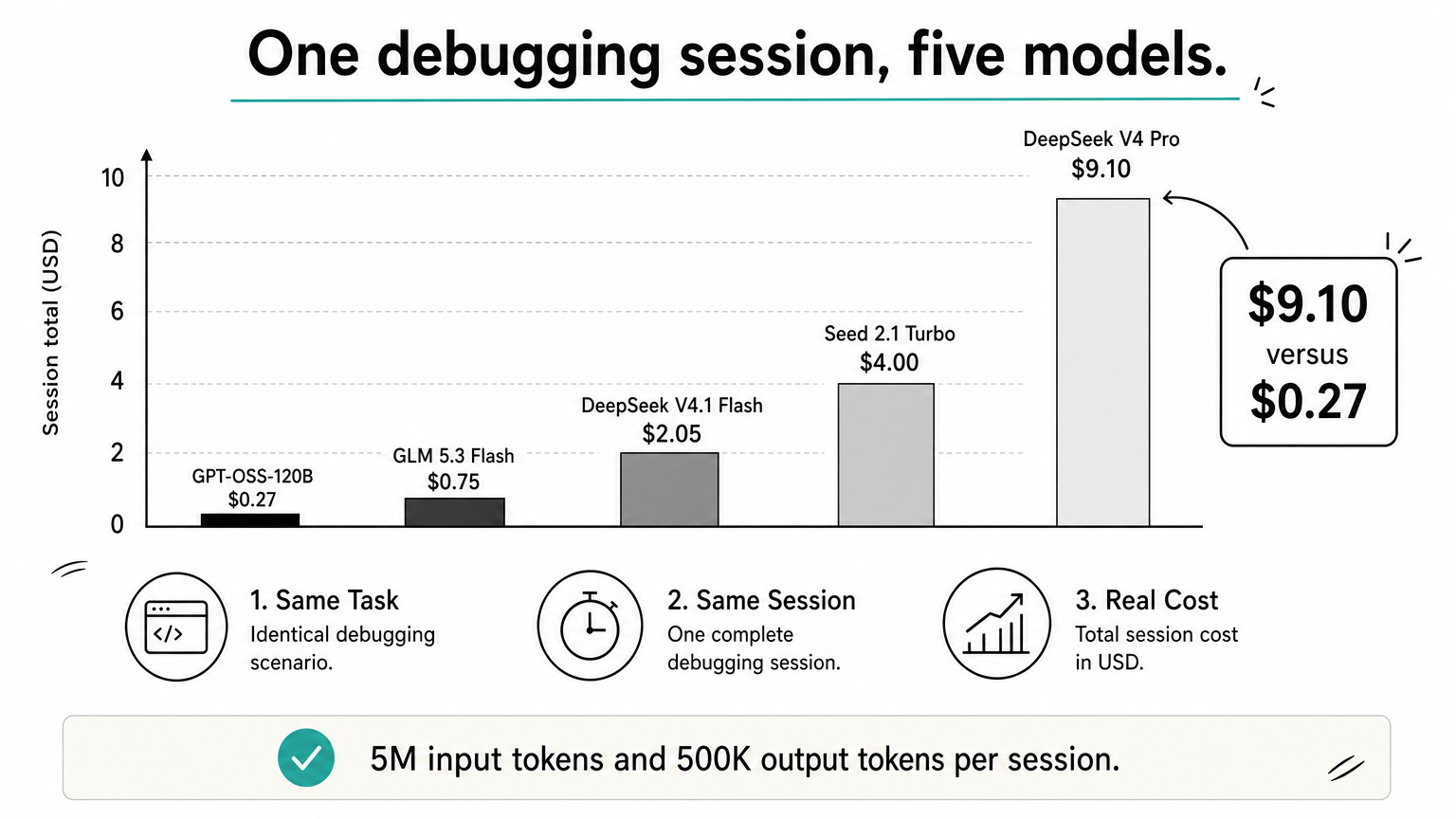
Agents re-send context on every step, so input tokens dominate the bill. Take a debugging session that uses 5M input tokens and 500K output tokens. Here is what each model costs:
| Model | Input cost | Output cost | Session total |
|---|---|---|---|
| GPT-OSS-120B | $0.195 | $0.079 | about $0.27 |
| GLM 5.3 Flash | $0.55 | $0.20 | $0.75 |
| DeepSeek V4.1 Flash | $1.50 | $0.55 | $2.05 |
| Seed 2.1 Turbo | $2.50 | $1.50 | $4.00 |
| DeepSeek V4 Pro | $7.40 | $1.70 | $9.10 |
Prices are the listed token rates for each model's product page. Confirm current figures there before you budget.
Which one to start with
Match the model to the constraint that bites first:
- Lowest cost, scoped tasks: GPT-OSS-120B
- Large repository in one prompt: GLM 5.3 Flash, then DeepSeek V4.1 Flash
- Hard problems that cheaper models fail: DeepSeek V4 Pro
- Long agent loops: Kimi K2.6
- Batch jobs and Norway or Colombo serving: Seed 2.1 Turbo
Data handling and region also decide purchases. Every model here except Seed 2.1 Turbo lists zero data retention by default on its sheet, and regions differ by model, so confirm the region on the model page if you have residency rules.
Then run the same ten real tasks from your own repository on two or three candidates. Count how many pass your tests and what each pass costs. Leaderboards cannot tell you that.
Choose by cost per passing task on your code, not by rank on a leaderboard.
How experienced developers structure LLM coding work
Experienced developers plan before they prompt, work in small steps, control what is in the context, and verify every output as if a junior engineer wrote it. The model changes the speed of the work, not who is responsible for it.
Plan first, then code in small steps
The most common mistake is asking for a whole feature from a vague prompt. Start by having the model interview you. A prompt like this works with any model:
I want to build [feature]. Ask me questions one at a time
until we have requirements, edge cases and a testing
strategy. Then write them up as spec.md.
Next, ask for a step-by-step plan from that spec, edit it, and only then start coding. Planning takes minutes and prevents wasted cycles later.
Then implement one step per request: one function, one bug, one test file. Large outputs drift and contradict themselves. Small ones you can read in full.
Control the context
Context is everything in the current conversation: your messages, the model's replies and any files you pasted. A conversation that has gone wrong is usually best fixed by starting a new one with a clean, short brief rather than arguing on.
Give the model what it cannot know. Paste in the files it must change, the error output and the documentation for any library released after its training cutoff. For code you want written precisely, supply the function signature and describe the body. Models respond well to that, and you stay the designer.
Test, review and commit
Run what the model writes. Paste failing test output back into the chat and let it iterate. Read the diff before you accept it, and look hardest at code that looks right. A second model reviewing the first model's output catches things a single pass misses.
Commit after each small task that passes. Frequent commits are save points: if the next suggestion breaks things, you roll back in seconds. Add a short rules file with your style conventions, such as lint rules and preferred patterns, and include it at the start of sessions so the model matches your codebase.
Call the model from your own tools
Any model above works through the OpenAI SDK. Point the client at the base URL from the model page and change the model ID to switch:
from openai import OpenAI

client = OpenAI(
    base_url="YOUR_GEODD_BASE_URL",  # from the model page
    api_key="YOUR_GEODD_API_KEY",
)

response = client.chat.completions.create(
    model="zai-org/glm-5.3-flash",
    messages=[
        {"role": "system", "content": "You are a careful senior engineer. Ask before guessing."},
        {"role": "user", "content": "Write a Python function that parses ISO 8601 dates and returns UTC datetimes."},
    ],
)
print(response.choices[0].message.content)
Swapping to deepseek-ai/DeepSeek-V4-Pro for a hard task is a one-line change, which makes the route-by-difficulty approach cheap to try.
The workflow matters more than the model: plan, slice, test, commit.
Start with one model and one real task
LLM coding rewards a simple habit: pick a model that fits your constraint, give it small, well-specified tasks with the right context, and test everything it writes. GLM 5.3 Flash is the sensible first try for most repository debugging, GPT-OSS-120B for cheap scoped work, and DeepSeek V4 Pro for what the others cannot solve.
Run your own ten tasks, compare cost per passing task, and keep the winner. When you are ready to try them side by side, browse the catalog of Geodd models, open the pages of the models you shortlisted, and call them through the OpenAI SDK you already use.