An MCP server is a program that gives an AI application controlled access to outside tools, data, and ready-made prompts through the Model Context Protocol, an open standard for connecting AI apps to other software. That is what the term means in one sentence. MCP stands for Model Context Protocol. The server is the side that offers capabilities, such as searching files, querying a database, or creating a calendar event. The AI application is the side that asks for them.
Before MCP, every pairing of an AI app and a tool needed its own connector. A shared protocol replaces that tangle with one connector per tool that any MCP-aware app can use. This article explains why that matters, how to connect and test a server, what servers expose, how the messages flow, how an MCP server differs from a regular API, and what to check before you trust one.
Geodd runs text, image, and video model inference behind an OpenAI-compatible API, so we see both halves of the picture. An MCP server gives a model something to act on, and an inference API supplies the model that decides what to do. This guide covers how the two fit together.
Why MCP servers matter
MCP servers matter because they give a model live, permissioned access to real systems through one standard interface, so you build each integration once instead of once per AI app. A model on its own knows only its training data and whatever text you paste into the prompt. It cannot read today's tickets, check inventory, or open a pull request. An MCP server is how it does those things.
The integration problem MCP servers solve
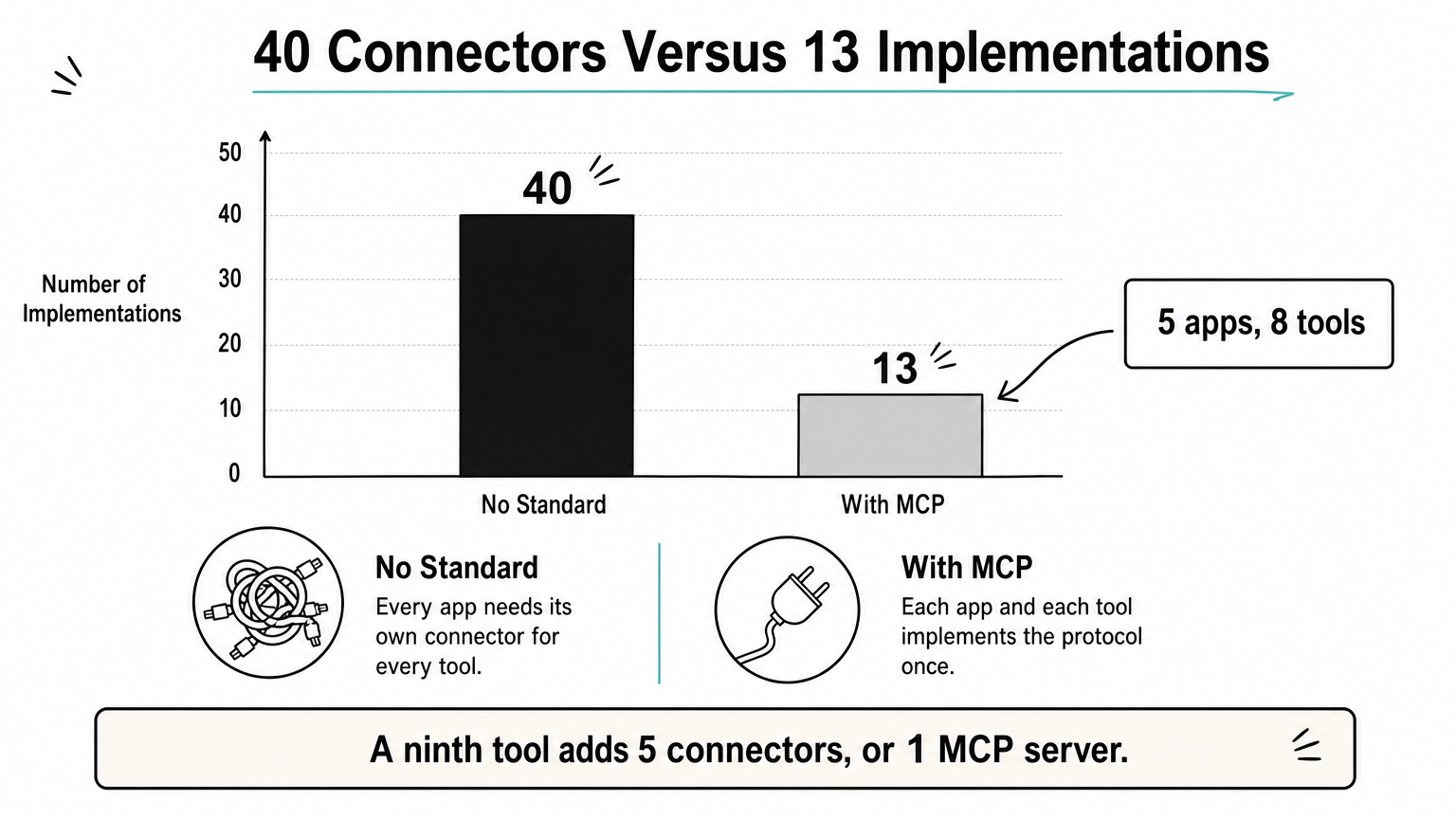
Without a standard, every AI app needs custom code for every tool it wants to use. The count grows as a product of the two sides. With a shared protocol, each app implements the client side once and each tool implements the server side once, so the count grows as a sum.
| Setup | Integrations to build |
|---|---|
| 5 AI apps and 8 tools, no standard | 5 × 8 = 40 custom connectors |
| 5 MCP clients and 8 MCP servers | 5 + 8 = 13 implementations |
Add a ninth tool and the custom approach costs five more connectors. With MCP it costs one more server, and all five apps can use it immediately.
An MCP server turns a tool integration from a per-app project into a reusable component.
What you gain by using one
The benefits show up quickly for both builders and buyers of AI products:
- Reuse across apps. A server written for one assistant works with any other app that speaks MCP.
- Model independence. Your tools do not care which language model sits behind the app, so you can switch models without rewriting integrations.
- Fresh data. The model reads from the source system at request time instead of relying on stale copies in a prompt.
- A clear permission boundary. The server decides what is exposed, and the host app can ask a human before anything risky runs.
When you do not need one
You do not need an MCP server if one application calls one API with fixed logic. A plain function in your code, exposed to the model through standard function calling, is simpler to build, test, and debug. There is no extra process to run and no protocol layer to learn.
The case for MCP gets stronger as soon as a second app, a second team, or a third-party assistant needs the same tool. It also gets stronger when you want users to bring their own tools to your app. If you expect none of that, start with direct function calling and move to a server later. The tool definitions transfer almost unchanged.
How to connect and test an MCP server
To start using an MCP server, pick one for a single job, add it to your AI app's configuration, restart the app, confirm the tools appear, and test with a read-only task before allowing anything that writes. The whole process takes about ten minutes for a local server.
Six steps from zero to a working server
- Choose a server for one job. Start with something narrow, such as read access to one project folder or one database with a read-only user.
- Decide local or remote. A local server runs on your machine as a subprocess of the app. A remote server runs elsewhere and you connect by URL, usually after signing in.
- Add it to the host's configuration. The host is the AI app, such as a desktop assistant or code editor. Most hosts use a JSON file or a settings screen.
- Restart the host and check the tool list. If the tools do not appear, the server did not start or the host could not reach it.
- Run a read-only test. Ask the assistant to list files or fetch a record, and watch which tool it calls.
- Turn on approvals for writes. Require a confirmation click for anything that changes data, sends a message, or spends money.
A sample configuration
Many desktop hosts accept a JSON file that maps a server name to the command that launches it. This example starts the reference file system server and limits it to one folder:
{
  "mcpServers": {
    "filesystem": {
      "command": "npx",
      "args": ["-y", "@modelcontextprotocol/server-filesystem", "/Users/you/projects"]
    }
  }
}
The command and args fields launch the server as a subprocess, and the folder path at the end is the boundary: the server only serves files under it. Field names and file locations differ between apps, so check your host's documentation before copying this. The reference servers are meant as examples of the protocol, so treat them as a starting point and review anything you run in production.
Testing and debugging
The quickest way to debug is to take the model out of the loop. The official MCP Inspector, started with npx @modelcontextprotocol/inspector, connects to your server, lists its tools, lets you call them with test arguments, and shows the raw messages. If a tool fails there, the problem is in the server. If it works there but the assistant never uses it, the problem is usually the tool description or the host setup.
Two failures cause most first-run problems. The launch command is wrong or Node or Python is missing from the path the host uses. Or a local server prints logs to standard output, which corrupts the message stream. Local servers should write logs to standard error or to a file.
What an MCP server exposes: tools, resources, and prompts
An MCP server exposes three kinds of capability: tools that the model can call, resources that supply read-only context, and prompts that package reusable instructions. They differ mainly in who decides when each one is used.
| Building block | What it is | Who decides to use it | Example |
|---|---|---|---|
| Tools | Functions that perform an action | The model | Search flights, send a message |
| Resources | Read-only data with a URI | The application | File contents, database schema |
| Prompts | Parameterized instruction templates | The user | "Summarize my meetings" |
Tools: actions the model can call
A tool is a function with a name, a description, and a JSON Schema for its inputs. The model reads the description, decides whether a request needs the tool, and fills in the arguments. A client discovers tools with tools/list and runs one with tools/call.
Tools are where servers do real work, so they are also where the risk sits. A tool can write to a database, call an external API, or change files. Good hosts show the tool call to the user and ask for approval, and good servers keep each tool narrow, with one clear operation and typed inputs.
Resources: read-only context
A resource is a piece of data the application can fetch and hand to the model as context. Each one has a unique URI, such as file:///path/to/document.md, and can declare a MIME type. Servers can list fixed resources or publish templates with parameters, such as weather://forecast/{city}/{date}, so one definition covers many lookups.
Because resources are application-driven, the app chooses how to use them. It might show a picker, include a file automatically, or search the contents with embeddings and pass only the best matches to the model. The server just makes the data available.
Prompts: reusable templates
A prompt is a stored instruction template with named arguments, such as a "plan a vacation" prompt that takes an origin, a destination, and dates. The user triggers it explicitly, often through a slash command or a menu, and the server returns the filled-in messages. Prompts give users a consistent way to start a task and show how the server's author intended the tools to be used.
One example, all three together
Picture a support-desk server. A create_ticket tool lets the model open a ticket. A tickets://customer/{id} resource template supplies the customer's history. A "triage my open tickets" prompt gives the user a one-click way to start.
Tools act, resources inform, and prompts guide, and a well-built server usually offers a mix of all three.
In a single session, the user picks the prompt, the app attaches the history resources, and the model calls the tool once it has enough context.
How an MCP server talks to an AI app
An AI app talks to an MCP server through an MCP client component that exchanges JSON-RPC 2.0 messages with the server, over standard input and output for local servers or over HTTP for remote ones. The client first asks what the server offers, then calls those capabilities as the model needs them.
Host, client, and server
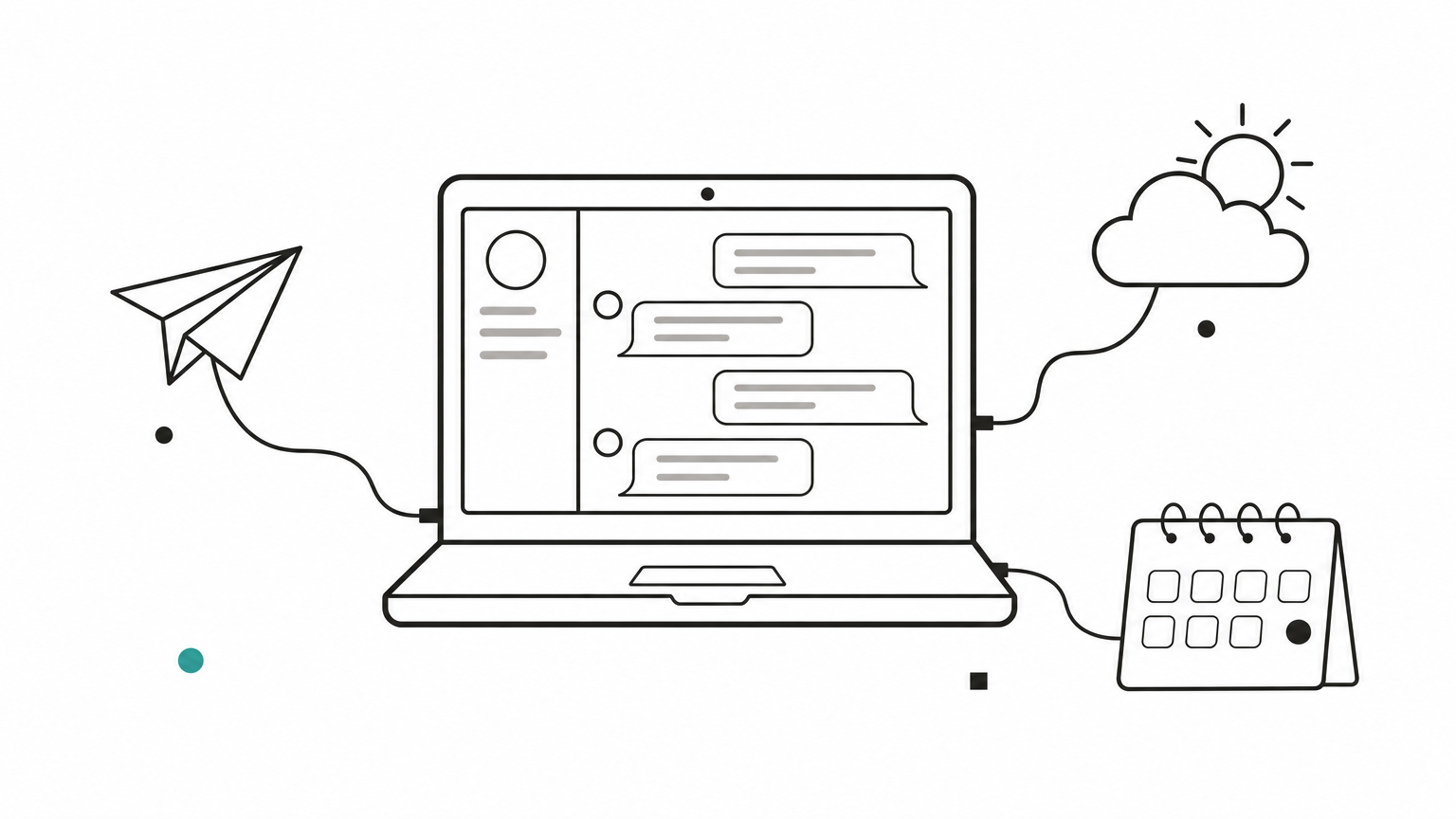
Three roles make up the architecture. The host is the AI application the user sees, such as a chat app or an editor. Inside it, the host creates one client per connected server, and each client keeps a one-to-one connection. The server is the program on the other end that offers tools, resources, and prompts.
This design lets one app use many servers at once. A travel assistant might connect to a flights server, a weather server, and a calendar server, and the model sees one combined tool list. The servers never see each other's data unless the host passes it along.
Local and remote transports
The two standard transports cover most deployments:
| Transport | Where the server runs | Typical use | Authentication |
|---|---|---|---|
| stdio | On your machine, as a subprocess of the host | Personal tools, file access, local dev | Inherits your user permissions |
| Streamable HTTP | On a remote host or in the cloud | Shared team servers, vendor-hosted servers | Tokens or OAuth-based sign-in |
Local servers are simple and fast but run with your account's permissions, so scope them tightly. Remote servers are easier to share and update, and they need proper authentication because anyone who can reach the URL could otherwise call the tools.
What a tool call looks like
A tool call is a small JSON-RPC request. The client sends the method name and the tool's arguments, and the server replies with content the model can read:
{
  "jsonrpc": "2.0",
  "id": 1,
  "method": "tools/call",
  "params": {
    "name": "searchFlights",
    "arguments": { "origin": "New York", "destination": "Barcelona", "date": "2027-06-15" }
  }
}
The arguments must match the inputSchema the server published through tools/list, which is how the model knows what to send. The protocol is versioned by date, and details such as capability negotiation have changed between revisions. Build against the revision your SDK targets and let the SDK handle the wire format.
Discovery comes first and invocation second, which is why a model can use a tool it has never seen before.
MCP server vs API
An API is an interface that a developer codes against, while an MCP server is a layer that lets a model discover and use capabilities on its own. In most real systems the two are stacked: the MCP server calls one or more APIs underneath. MCP does not replace your APIs. It wraps them in a form a model can use.
Side-by-side comparison
| Dimension | Regular API | MCP server |
|---|---|---|
| Main consumer | A developer's code | An AI model, through a host app |
| Discovery | Read the docs, then write code | The client asks tools/list at runtime |
| Contract | Endpoints and response shapes unique to each service | One shared protocol and schema format |
| Effort per new AI app | A new integration for each service | None, if the app has an MCP client |
| Descriptions | Written for humans | Written so the model can pick the right tool |
| Control points | Your own application logic | Host approvals, server scoping, permission settings |
Why an MCP server usually sits on top of an API
A weather service already has a REST API. An MCP server for it defines a get_forecast tool, translates the model's arguments into the API request, handles authentication, and returns a compact answer. The API stays the same. What changes is that any MCP-aware assistant can now use it without custom code.
This is also why the question "MCP or API" is slightly off. The useful question is whether the consumer of the capability is a person writing code or a model choosing actions at runtime. For the second case, an MCP layer saves work and adds a place to enforce limits.
How to choose
Use a plain API when your own code decides every call and the logic is fixed. Use an MCP server when a model decides which capability to use, when several AI apps need the same tools, or when you want users to attach their own tools to your product. Many teams do both, keeping the API as the stable core and the MCP server as the model-facing front door.
If your own code makes the decision, call the API. If a model makes the decision, put an MCP server in front of the API.
Where the language model fits in
The MCP server never runs or contains the language model. The host app sends your conversation and the available tool definitions to a model, the model replies with a tool call, the host forwards it to the server, and the result goes back to the model. Understanding this loop shows you which part of your stack does what.
The server does not run the model
An MCP server is a capability provider. It has no opinion about which model reasons over its results. That is why the same server works with different assistants and different model providers. The model is reached separately, usually through a hosted inference API, and the host stitches the two together.
That also means the quality of the experience depends on two independent choices: how well the server is built, and how well the model handles tool use. A great server paired with a model that picks the wrong tool or malforms arguments will still fail.
Passing MCP tools to an OpenAI-compatible API
MCP tool definitions map almost directly onto function calling in OpenAI-compatible chat APIs. The tool's name and description carry over, and its inputSchema becomes the function's parameters. A host loop looks like this:
from openai import OpenAI

client = OpenAI(base_url="YOUR_BASE_URL", api_key="YOUR_API_KEY")

# tools = (await session.list_tools()).tools   # from your MCP client session
def to_openai_tool(t):
    return {
        "type": "function",
        "function": {
            "name": t.name,
            "description": t.description,
            "parameters": t.inputSchema,
        },
    }

response = client.chat.completions.create(
    model="MODEL_ID",
    messages=messages,
    tools=[to_openai_tool(t) for t in tools],
)
# For each tool call in the reply, run session.call_tool(name, arguments),
# append the result as a "tool" message, and call the model again.
Because Geodd's API is OpenAI-compatible, pointing a loop like this at it is a matter of changing the base URL, the key, and the model ID. Copy those values from the model's page.
Choosing a model for MCP work
Check four things before wiring a model into an agent loop. It must support tool calling, since without it the model cannot request tools at all. Its context window must hold the tool list plus the results. Structured output support helps when you need strict JSON. And its data handling must match your requirements, because tool results are sent to the model as part of the prompt.
Capabilities are version-specific, so confirm them for the exact model version you plan to use. GLM 5.3 Flash and DeepSeek V4.1 Flash are different products from GLM 5.2 and DeepSeek V4 Flash, and their listed features can differ. On Geodd, API prompts, outputs, and uploaded files are not stored unless separately agreed in writing, and API data is not used for model training. EU customers get API inference hosted in EU data center infrastructure by default.
A model without reliable tool calling will waste a good MCP server, so verify tool support before you build the loop.
Common MCP server examples
What are MCP servers used for in practice? They cover the places where AI work meets real data: files, databases, code hosts, chat tools, and calendars. The table shows the usual categories and the access level you should plan around.
| Server type | What it exposes | Sensible starting access |
|---|---|---|
| File system | Read, search, and write files in chosen folders | Read-only on one folder |
| Database | Schema browsing and queries | Read-only database user |
| GitHub | Issues, pull requests, code search | Read, then limited write |
| Slack | Channel history, posting messages | Read, with approval for posts |
| Calendar | Events and availability | Read, with approval for creating events |
Developer and data servers
File system, database, and code-host servers are the most common starting points because the value is obvious. An assistant that can read your project folder, inspect a database schema, and open a pull request can do work that a chat window alone cannot. Code editors such as VS Code can host MCP servers for their built-in assistants, which makes this the easiest place to experiment.
Keep database access read-only at first and use a dedicated database user, so a bad query can never modify data. Most real incidents come from tools that were given more power than the task needed.
Business application servers
Many software vendors now publish MCP servers for their own products, and companies build internal ones for their CRM, ticketing, or knowledge base. An internal server is often the best investment. It wraps one system with the right permissions, logging, and data masking, and every approved AI app then reaches that system through the same door.
Community servers exist for niche tools too, including creative software such as Blender. They are useful for experimentation, but you should read the code or at least the permissions before running one.
Reference and community servers
The official repository of reference servers shows how to use the SDKs and demonstrates each protocol feature. Its authors describe the servers as educational examples, not production-ready solutions. Use them to learn the patterns, then harden what you deploy with your own authentication, logging, and limits.
Start with read-only servers on narrow scopes, and widen access only after you have watched the tool calls in practice.
Security risks and how to reduce them
The main risk of an MCP server is that a model can be steered into using powerful tools in ways you did not intend, so every server needs least-privilege access, human approval for risky actions, and a trusted source. The protocol gives hosts the hooks for this, but you still have to configure them.
The risks to know about
- Over-broad permissions. A file server pointed at your home folder, or a database tool with write access, turns a model mistake into data loss.
- Prompt injection through content. Text that a tool returns, such as a web page, an email, or a ticket, can contain instructions aimed at the model. The model may follow them.
- Untrusted servers. A local server runs code on your machine. A malicious or careless one can read files or send data elsewhere.
- Tool description tampering. Tool descriptions are read by the model, so a changed description can alter its behavior, even if the user never sees it.
- Credential leakage. Servers often hold API keys and tokens, and sloppy logging can expose them.
A practical hardening checklist
Apply these in order, starting with the ones that cost the least:
- Give each server the minimum scope: one folder, one schema, one repository.
- Start read-only, and require approval for any tool that writes, sends, deletes, or spends.
- Run only servers from sources you trust, and pin the version you reviewed.
- Use separate credentials per server so one leak does not expose everything.
- For remote servers, require authentication, and prefer OAuth-based sign-in with short-lived tokens over shared static keys.
- Log every tool call with its arguments and result so you can audit what the model did.
- Treat all returned content as untrusted input, especially when a task combines private data with content from outside sources.
The last point deserves emphasis. Danger is highest when one session can read private data, process untrusted text, and send information out. Break that combination by removing one of the three, usually the ability to send.
Never let a single agent session combine private data, untrusted content, and an outbound channel without a human in the loop.
Common questions about MCP servers
These are the short answers to the questions people ask most after learning what an MCP server is.
Does ChatGPT use MCP?
Yes, in part. OpenAI announced MCP support in early 2025 for its Agents SDK, and its developer platform and ChatGPT offer ways to connect MCP servers. Support differs by product, plan, and mode, so check OpenAI's current documentation for what your account allows.
MCP began as an Anthropic project and is now supported across many assistants, editors, and agent frameworks. That broad support is the reason a server you build once is useful in several places.
Is an MCP server free or paid?
The protocol is open, and many servers are open source and free to run. Costs come from elsewhere: the model tokens your assistant uses, the underlying service whose API the server wraps, and any hosting for a remote server. Some vendors offer hosted MCP servers as part of a paid plan.
A free server can still create a bill, because every tool result becomes input tokens for the model. Keep tool outputs compact to control it. Per-token pricing on a hosted inference API makes that cost easy to estimate from request volume.
What does MCP server mean, and is it just a plugin?
The meaning is simple: a server that follows the Model Context Protocol so AI apps can use its capabilities. Calling it a plugin for language models is a fair shorthand, with one difference. Classic plugin systems were tied to one vendor's app, while an MCP server works with any host that implements the client side.
It is also not an agent. The server does not plan or decide anything. It exposes capabilities, and the model in the host app decides how to use them.
Can I build my own MCP server?
You can, and official SDKs exist for several languages, including Python and TypeScript. A minimal server defines a few functions, describes their inputs, and runs over stdio. The hard parts are not the protocol. They are writing tool descriptions the model understands, keeping outputs small, and scoping permissions.
Start with one tool that does one thing well, test it in the Inspector, and then connect it to a host. Add resources and prompts only when you have a use for them.
What to do next
An MCP server is a standard doorway between an AI application and the tools and data it needs. It exposes tools, resources, and prompts, it talks to the host over JSON-RPC, and it usually wraps existing APIs instead of replacing them. Use one when a model chooses the actions or when several apps share the same tools, and keep access narrow until you have watched it work.
The server is only half of a working setup. The model behind your app has to handle tool calling reliably, and it has to run on infrastructure whose data handling you accept. If you want to try the full loop, you can test tool calling with GPT-OSS-120B through Geodd's OpenAI-compatible API, where the model page lists pricing, regional endpoints, data handling, and SDK examples.